
Retained memory
Overview
Let's consider ways to extend retained variable memory to hold large amounts of data
- On the NJ series, check whether "memory for CJ units" is enough
- How to "save variables to files"
- "Using files as memory" reads and writes files directly as a substitute for memory
First, consider whether CJ memory can be used instead of retained memory
If memory is still insufficient, on the NX series consider "saving variables to files" or "using files as memory"
A method that groups the variables to retain into a structure and saves the whole structure to a file periodically or on events
Think of it as a snapshot: at power-on the snapshot is restored to return to the most recent data
This method treats a file like physical memory and writes value changes in order
Therefore write time must be considered; assign frequently changing variables to retained variable memory and use this method for variables that change little but need to be retained
Making effective use of CJ memory
Overview
Memory for CJ units can be used as retained memory, but
DM has areas used by CJ units, so only the EM area is used as retained memory
* Memory for CJ units exists only on the NJ series (some NX series models allocate retained memory to memory for CJ units)
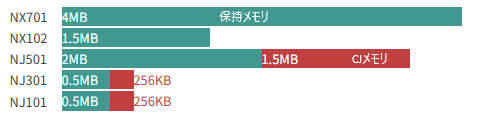
Memory for CJ units (retained)
| DM | D0~D32767 |
D20000 to D29599 cannot be used (for CJ special I/O units) D30000 to D31599 cannot be used (for CJ CPU bus units) |
| EM | E0_0~E3_32767 | |
| EM | E3_0~E18_32767 | Usable on NJ501 only (20 banks, 03 hex to 18 hex) |
EM has 32767 words per bank, so 65536 bytes = 64 KB
On the NJ501, 64 KB × 24 banks = 1.5 MB can be used as retained memory
On the NJ101 and 301, likewise 256 KB can be used as retained memory
How to set it up
Memory for CJ units can be used by setting the start address, such as %E0_0, with AT specification in the allocation field of global variables or POU variable settings
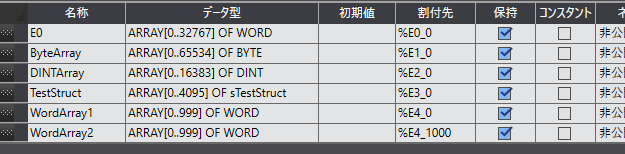
E0, a WORD array of 32868 elements, was allocated to E0_0 to E0_32767
ByteArray, a BYTE array of 65536 elements, was allocated to E1_0 to E1_32767
DINTArray, a DINT array of 16384 elements, was allocated to E2_0 to E2_32767
TestStruct, an sTestStruct array of 4095 elements, was allocated to E3_0 to E3_32767 (sTestStruct is a 16-byte structure)
WordArray1, a WORD array of 1000 elements, was allocated to E0_0 to E0_999
WordArray2, a WORD array of 1000 elements, was allocated to E0_1000 to E0_1999

Checking Memory Usage shows that retained variable memory is not consumed
Notes
Areas spanning banks cannot be set
For example, you cannot set %E0_0 as the allocation and a variable larger than 32768 words (65536 bytes)
Be careful that allocations do not overlap
For example, it is possible to set a 1000-byte variable allocated at E0_0 and a 1000-byte variable allocated at E0_500
In that case E0_500 to E0_999 overlap between the two variables, so their values become undefined
Saving variables to files
A method for holding large amounts of data that uses non-retained variables as normal memory while storing them on the SD card as files
We look at how to write variables to the SD card and the characteristics
Writing a large variable entirely to SD
Create a large variable in non-retained variable memory and write the whole variable to SD with the FileWriteVar instruction
This creates a variable whose values are retained up to the time the file was written, although changes after writing until power-off are not retained
When retained variables run short, consider holding variables that are fine to roll back a little in files this way
Values written to the file are read with the FileReadVar instruction at power-on
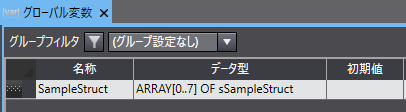
Structures

Global variable
Memory usage

Ladder logic
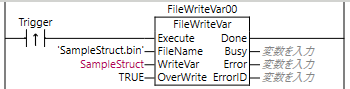
Write time measurement
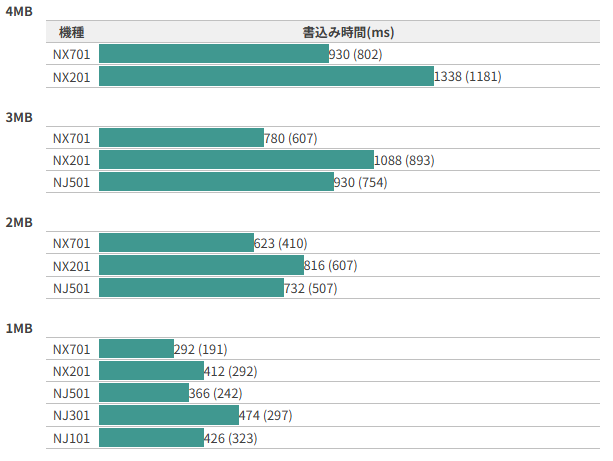
I measured write times by changing the number of SampleStruct elements in the variable written (WriteVar) to sizes of 4 MB, 3 MB, 2 MB and 1 MB
When writing to a file periodically, adjust the timing of the write processing using at least twice this write time as a guide
Maximum of 100 measurements (average in parentheses)
Using files as memory
A method for holding large amounts of data that uses a file on the SD card instead of retained memory
We look at how to use a file as memory and the characteristics
Using files as memory
Create a file of any size on SD and write values directly to physical addresses in that file
The physical address is the number of bytes from the start of the file
Note that variables are written to the file through a write buffer, which takes time
When reading, you must wait for writing to finish before reading
Therefore variables whose values change frequently are not suited to this processing
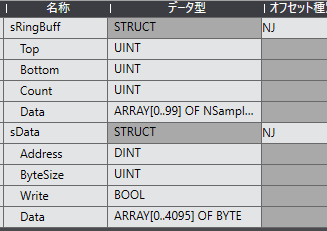
Write ring buffer
Maximum size of a write variable: 4096 bytes
Number of buffers: 100
Write function
Adds data to the write buffer with the write data and address specified
| MemWriteSINT |
| MemWriteUSINT |
| MemWriteBYTE |
| MemWriteINT |
| MemWriteUINT |
| MemWriteWORD |
| MemWriteDINT |
| MemWriteUDINT |
| MemWriteDWORD |
| MemWriteLINT |
| MemWriteULINT |
| MemWriteLWORD |
| MemWriteREAL |
| MemWriteLREAL |
| MemWriteTIME |
| MemWriteDATE |
| MemWriteTOD |
| MemWriteDT |
| MemWriteSTRING |
[Example]
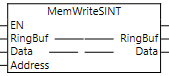
- Ringbuf
- sRingBuff
- Write ring buffer
- Data
- ARRAY[*] OF ??
- Write data
- Address
- DINT
- Write byte position
File write FB
Writes from the write buffer to the file
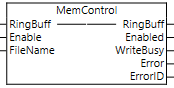
- Ringbuf
- sRingBuff
- Write ring buffer
- FileName
- STRING[66]
- File name
- WriteBusy
- BOOL
- Writing
File read FB
Reads a value from the specified address when Trigger turns ON
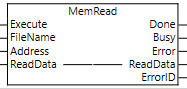
- FileName
- STRING[66]
- File name
- Address
- DINT
- Read start byte position
- ReadData
- ARRAY[*] OF BYTE
- Read data
How to Use
The write function (MemWrite???) adds the value you want to write to the write ring buffer
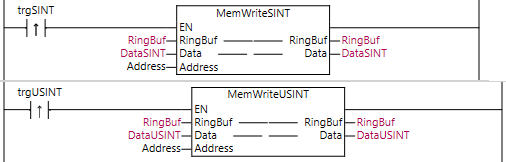
The data accumulated in the ring buffer is written to the file by the file write FB (MemControl)
By always running just one instance of this file write FB (MemControl) at the end of the program, the ring buffer data is written to the file in order

