
How to Receive Event Notifications with CX-Compolet
With OMRON CX-Compolet, you can receive changes in PLC variables as events. This article explains how to notify a C# application of changes in PLC variables using VariableCompolet.
What Are CX-Compolet Event Notifications?
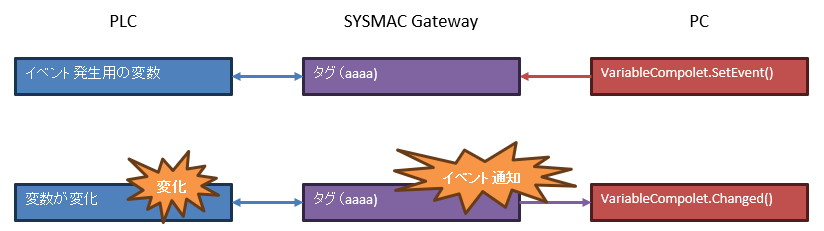
When you want the PLC side to control when PLC data is acquired, SysmacGateway can detect changes in variables
The Compolet can receive a change notification from SysmacGateway as an event
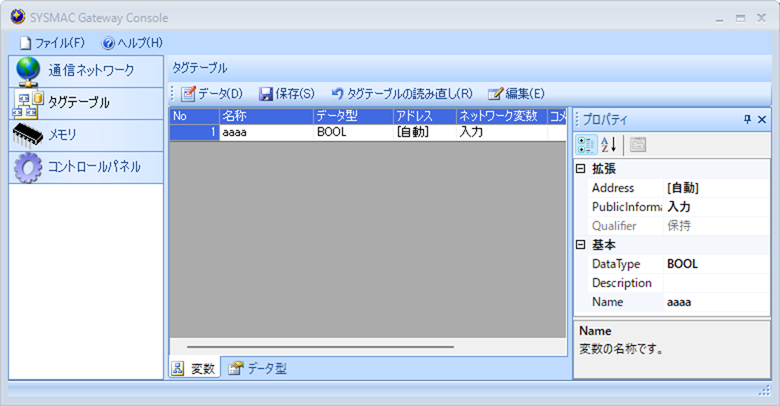
A tag data link must be set up between the PLC variables and the SysmacGateway tags (set the tag data link with Network Configurator)
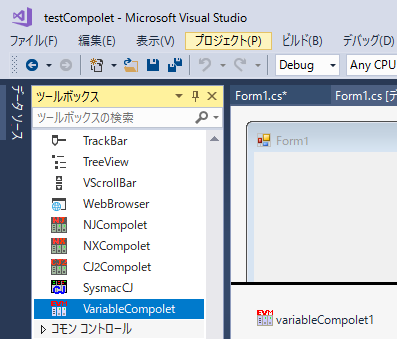
Place VariableCompolet on the form with the instance name VariableCompolet1
VariableCompolet is a component that operates SysmacGateway; an event occurs when a value in SysmacGateway memory changes
The sample code below is written in C#
Creating the form (placing buttons, etc.) is omitted, so place buttons and so on as needed
Registering PLC variable events with VariableCompolet
Click button7 to set the Active property to True, then set the Windows handle and the variable that raises the event
Assume the PLC has a BOOL variable named "aaaa"
private void button7_Click(object sender, EventArgs e)
{
	try
	{
		variableCompolet1.Active = true;
		variableCompolet1.WindowHandle = this.Handle;
		variableCompolet1.SetEvent("aaaa", 1);
	}
	catch (Exception ex)
	{
		Console.WriteLine(ex.Message);
	}
}
Explanation
Lines 5-7
variableCompolet1.Active = true;
variableCompolet1.WindowHandle = this.Handle;
variableCompolet1.SetEvent("aaaa", 1);
Line 5: set Active to True to enable the component
Line 6: set the application handle (this.Handle) to the Compolet's WindowHandle
Line 7: set event ID 1 for the variable aaaa
Receiving PLC variable changes with the Changed event
Generate variableCompolet1_Changed for the Changed event of variableCompolet1
When a variable set with SetEvent above changes, variableCompolet1_Changed is executed
private void variableCompolet1_Changed(object sender, EventArgs e)
{
	int eventID;
	string variableName;

	try
	{
		variableCompolet1.ReceiveEvent(out variableName, out eventID, 0);
		object ret = variableCompolet1.ReadVariable(variableName);
		Console.WriteLine(variableName + " = " + ret.ToString());
	}
	catch (Exception ex)
	{
		Console.WriteLine(ex.Message);
	}
}
Explanation
Line 1
private void variableCompolet1_Changed(object sender, EventArgs e)
The Changed event occurs when the variable aaaa set with SetEvent("aaaa", 1) changes
Lines 8-9
variableCompolet1.ReceiveEvent(out variableName, out eventID, 0);
object ret = variableCompolet1.ReadVariable(variableName);
Line 8: get the changed variable name and event ID with ReceiveEvent
Line 9: read the value of the obtained variable name with ReadVariable
Note
The help states that with Windows messages, when multiple events occur at the same time they may be combined
For details, see the help for the Changed event of VariableCompolet