
CX-Compolet
What Is CX-Compolet?
CX-Compolet is a .NET communication library from OMRON. It lets you access PLCs from Visual Basic or C# and read/write variables and memory areas.
| Item | SYSMAC Gateway | Fins Gateway |
|---|---|---|
| Communication method | CIP | FINS |
| Access target | Variables | DM/CIO etc. |
| Main target PLCs | NJ/NX/NY | CJ/CS/CV (NX/NJ) |
Configuration
Components provided by CX-Compolet are built into an application written in Visual Basic or C#, which accesses the PLC via FinsGateway or SYSMAC Gateway
The gateway used depends on the component
FinsGateway for accessing physical addresses
SYSMAC Gateway for accessing variables

Preparing the Communication Middleware
Setup
CX-Compolet requires the communication middleware SYSMAC Gateway or FinsGateway
The communication middleware is bundled with CX-Compolet and installed together with it
SYSMAC Gateway
SYSMAC Gateway is required to connect with the CIP protocol (EtherNet/IP)
With the CIP protocol, values are read and written by specifying variables
The PC connects to an EIP unit or the CPU's built-in EIP port
Start SYSMAC Gateway Console and open the network port

NOTE
Communication sometimes failed when IPv6 was checked in the Ethernet adapter properties
If you cannot connect, try unchecking it

FinsGateway
FinsGateway is required to connect with the FINS protocol
With the FINS protocol, values are read and written by specifying physical addresses (such as DM0000)
The PC connects to an ETN unit, an EIP unit or the CPU's built-in EIP port
Start the FinsGateway settings and start ETN_UNIT
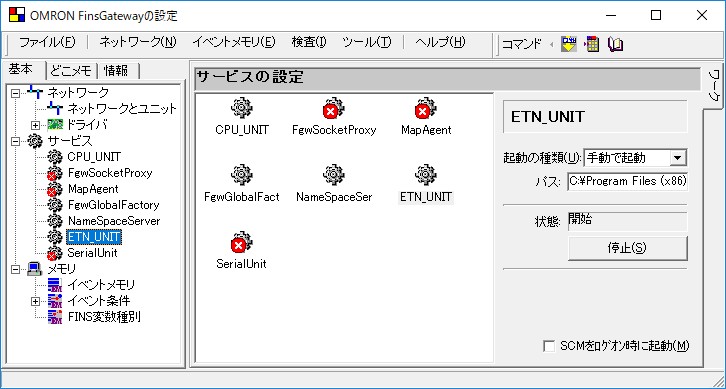
Next, open the properties of local network 0 (Ethernet) and, on the Communication Unit tab, select the network card the PLC is connected to

Preparing Visual Studio
Choose items
Open [Tools] - [Choose Toolbox Items] from the menu bar
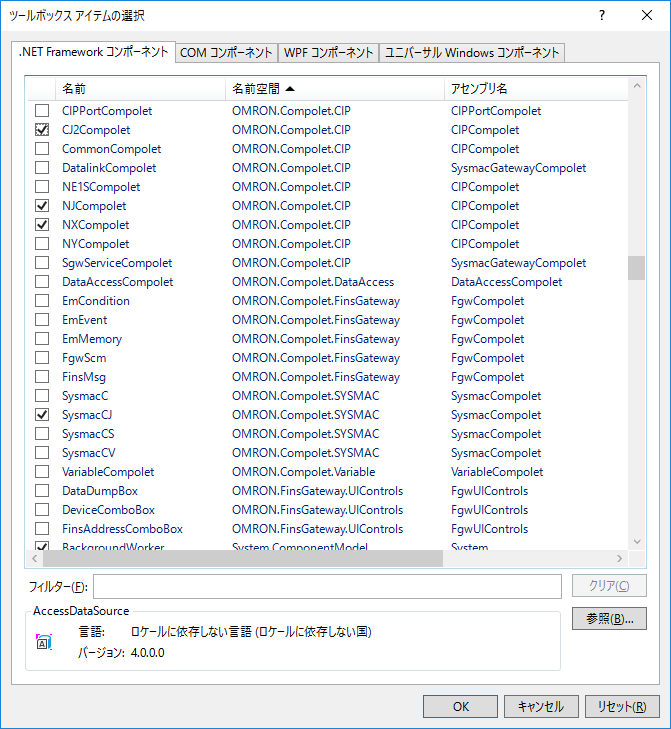
SYSMAC Compolet
Can read/write PLC memory areas, read the PLC status and more
| Component | Overview | Gateway used |
|---|---|---|
| CJ2Compolet | CIP communication with CJ2 | SysmacGateway |
| NE1SCompolet | CIP communication with NE1S | |
| NJCompolet | CIP communication with NJ | |
| NXCompolet | CIP communication with NX | |
| NYCompolet | CIP communication with NY series | |
| CommonCompolet | Reading/writing ODVA standard tags | |
| DataAccessCompolet | All CIP communication | |
| SysmacC | FINS communication with C series | FinsGateway |
| SysmacCV | FINS communication with CV series | |
| SysmacCS | FINS communication with CS series | |
| SysmacCJ | FINS communication with CJ series |
SYSMAC Gateway Compolet
Accesses SYSMAC Gateway to get information about and operate CIP communication services
| Component | Overview |
|---|---|
| VariableCompolet | Reading/writing variables registered in SYSMAC Gateway |
| PortCompolet | Opening/closing Ethernet ports |
| SYSMAC Gateway Service Compolet | Operating and getting information on CIP communication services |
| DataLinkCompolet | Configuring and getting the status of CIP data links |
Fins Gateway Compolet
Accesses FinsGateway to read/write FinsGateway event memory and more
| Component | Overview |
|---|---|
| VariableCompolet | Reading/writing variables registered in SYSMAC Gateway |
| PortCompolet | Opening/closing Ethernet ports |
| SYSMAC Gateway Service Compolet | Operating and getting information on CIP communication services |
| DataLinkCompolet | Configuring and getting the status of CIP data links |
Help and Samples
Help
The help files are in [Start] - [OMRON] - [CX-Compolet]
- FinsGateway Compolet help
- SYSMAC Compolet help
- SYSMAC Gateway Compolet help
Samples
The CX-Compolet samples are in [Start] - [OMRON] - [CX-Compolet] - [samples]
- DataAccess Compolet
- FinsGateway Compolet
- Port Conpolet
- SysmacC C-CV-CS-CJ Compolet
- SYSMAC CJ2-CIP Compolet
- SysmacGateway Compolet
- Variable Conpolet
Simple samples
The links below explain samples kept as simple as possible, focusing on message communication
CIP Communication
A sample that connects to the PLC and reads/writes variable values, and
a sample that writes the PC time to the PLC
FINS Communication
A sample that connects to the PLC and reads/writes DM values
Event Notification
A sample that notifies the application with an event when a PLC variable changes
Read Communication Time
The communication time for reading memory values depends mainly on the number of packets
For example, in the table below, reading 492 bytes (286 words) with CIP UCMM communication takes one packet and about 5 ms, but reading 494 bytes (287 words), just 2 bytes more, takes two packets and about 10 ms
Adding just 2 bytes can increase the read time like this, so keep it in mind if you want faster reads
CIP communication
Read time when reading variable values with NXCompolet.ReadVarible


| Number of packets | UCMM | Class3 | ||
|---|---|---|---|---|
| Byte count | Communication time (ms) | Byte count | Communication time (ms) | |
| 1 | 492 | 5.473 | 1984 | 5.753 |
| 2 | 984 | 10.305 | 3968 | 10.294 |
| 3 | 1476 | 15.517 | 5952 | 15.417 |
| 5 | 2460 | 27.289 | 9920 | 25.046 |
| 10 | 4920 | 52.235 | 19840 | 55.068 |
| 20 | 9840 | 108.019 | 39680 | 107.269 |
FINS communication
| Number of packets | Byte count | Communication time (ms) |
|---|---|---|
| 1 | 1998 | 8.579 |
FAQ
What is CX-Compolet?
CX-Compolet is a .NET communication library from OMRON that lets you access PLCs from Visual Basic or C# and read/write variables and memory areas.
What is the difference between SYSMAC Gateway and FinsGateway?
SYSMAC Gateway uses CIP communication to access the variables of NJ/NX/NY series controllers. FinsGateway uses FINS communication to access memory areas such as DM and CIO.
What software is required to use CX-Compolet?
CX-Compolet requires SYSMAC Gateway or FinsGateway as communication middleware. These are bundled with CX-Compolet.
Which Compolet should I use to access NJ/NX series variables?
Use the NJCompolet class for the NJ series and the NXCompolet class for the NX series to access variables via CIP communication.
Do CIP and FINS communication access different things?
CIP communication targets PLC variables; FINS communication targets physical addresses such as DM and CIO.