
日本語
English
The Simplest Way to Log to a CSV File
How CSV Logging Works
Structure data is converted to a comma-separated CSV string with the AddDelimiter instruction and written to the SD card with the FilePut instruction
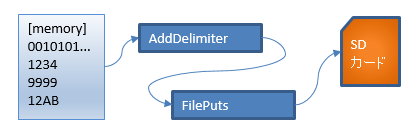
Functions used
Uses only standard FBs
Structure for logging
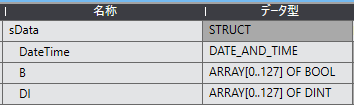
Ladder program example
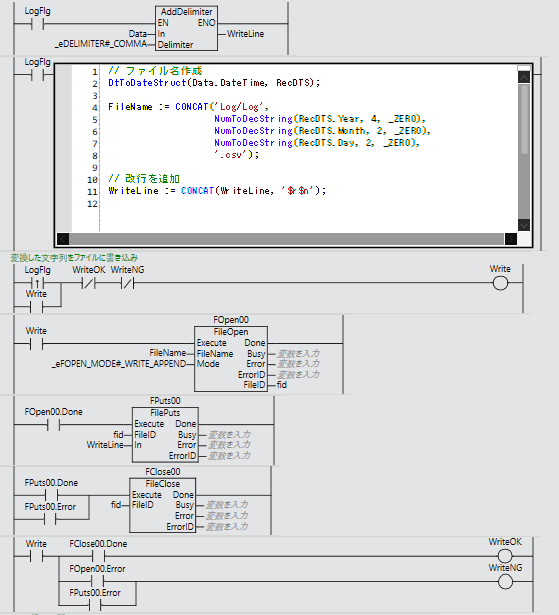
When the LogFlg contact turns ON, AddDelimiter runs and outputs Data as a comma-separated string to WriteLine
The FilePut instruction writes the contents of WriteLine to the SD card with a file name of the date of Data.DateTime + ".csv"
Advantages and disadvantages of this method
| Item | Description |
|---|---|
| Advantages | Simple configuration that is easy to understand |
| Advantages | CSV format opens in Excel |
| Disadvantages | Not suited to high-speed sampling |
| Disadvantages | Affected by SD card write time |
FAQ
Can the CSV file be opened in Excel?
Yes. It is in CSV format, so it can be viewed in Excel or a text editor.
Can it be used for fast logging?
It is affected by SD card write time, so it is not suited to fast logging. The ring buffer method is recommended for fast collection.
What applications is it suited to?
Collecting equipment data and saving operation history at intervals of a few seconds to tens of seconds.
Download

If you found this site helpful, your support would be greatly appreciated