
How to Display Trend Graphs on the NA Screen
Overview
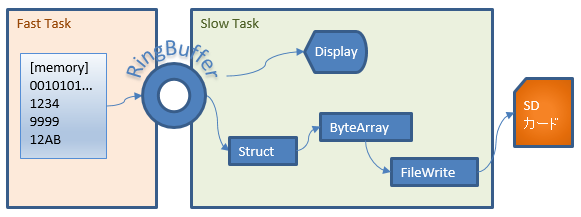
The primary task (FastTask) adds data to the ring buffer every scan
If adding continues after the ring buffer is full, the oldest data is overwritten and erased
NA graph display
The NA graph display creates the graph by looking at the ring buffer data (the buffer is not read out, so the count does not change)
File output
The ring buffer count decreases only when saving files during continuous recording
Continuously outputting records to files
By saving data while recording continuously, continuous data can be saved
Files are switched every 10,000 records so they can be read by Sysmac Studio trace
File sequence numbers loop from 0 to 359, keeping the last hour of files on the SD card
Note
- Continuously recording 128 BOOL points + 32 DINTs creates about 1.8 GB of files per hour
- With an OMRON SD card, the SD life warning is shown on the HMI
Structures
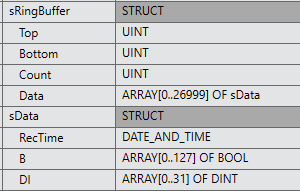
Record size
| Bits (BOOL) | 128 |
| Numbers (DINT) | 32 |
| Number of buffers | 27,000 (27 seconds at a 1 ms period) |
Structures
Global variable

The data to record is assumed to be linked via EIP tag data links
Set the values you want to record in the link area of the linked PLC
Of course, the PLC's own internal memory can also be recorded without linking
Screens
Graph screen
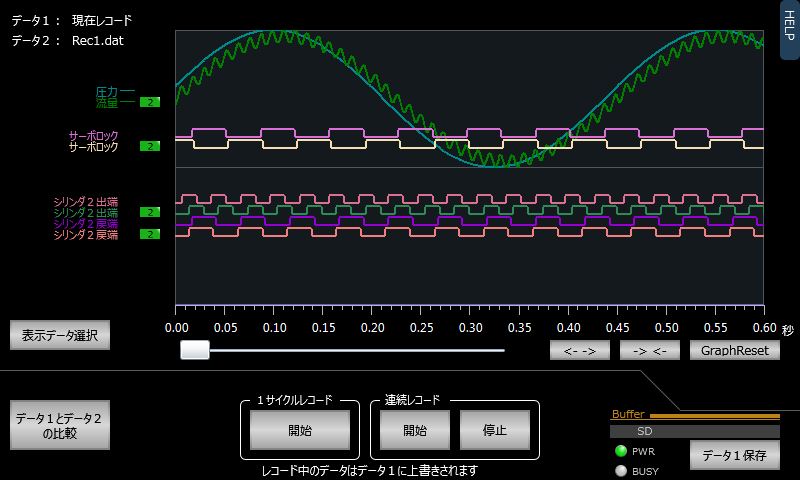
Data 1 and data 2 are displayed so they can be compared
Pressing [Start] for single-cycle recording records for 27 seconds and stops
Pressing [Start] for continuous recording continues recording until [Stop] is pressed
Both kinds of recording overwrite data 1
To save to a file, press [Save Data 1] and save to one of files 0 to 9
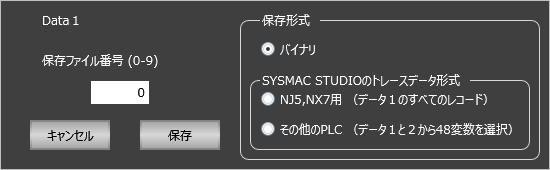
| Binary | Creates files that can be read as data 1 or data 2 in the graph display |
| For NJ5, NX7 | Creates a CSV file of the data 1 records in a format that can be imported into Sysmac Studio trace |
| Other PLCs | Selects variables from data 1 and data 2 and creates a CSV file in a format that can be imported into Sysmac Studio |
Graph display settings
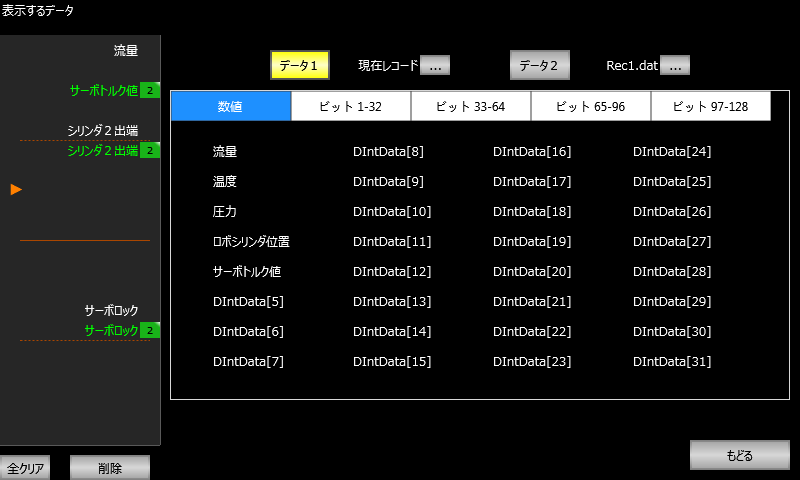
Up to 20 items of data to display can be registered in the list on the left
Touch a variable on the right to register it in the list on the left
Pressing the [Data 1] or [Data 2] button switches the variable list
To load a record file, press [...] and select and open one of files 0 to 9
FAQ
How are graphs displayed on the NA screen?
Record data in the ring buffer is read and displayed as an NA trend graph. Data is not consumed, so the record count does not decrease.
Can files be saved during continuous recording?
Yes, files can be saved while recording continuously. Files are switched every 10,000 records, and up to 1 hour of data can be saved.
Can it be used with Sysmac Studio?
Yes, saved data can be converted to or output in Sysmac Studio data trace format and used as trace data.
How much data can be recorded?
128 BOOL points and 32 DINT points for up to 27,000 samples. At a 1 ms period, about 27 seconds of history can be saved.
