
How to Display and Analyze Data Recorded on a PLC on a PC
Overview
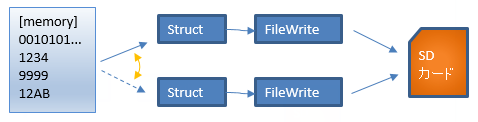
The primary task (FastTask) adds data to a structure every scan
When the structure is full, it switches to the other structure and continues adding data
The full structure is saved in its entirety to SD as a binary file
File names get sequence numbers, and when the maximum is reached the number returns to 0 and files are overwritten
For example, if you decide to keep 100 files, name them 0 to 99 in order and return to 0 for the next file, cycling the file names to keep the last 100 files of data
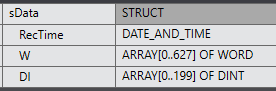
Structures
Record size
| Bits (BOOL) | 10,048 |
| Numbers (DINT) | 200 |
| Number of buffers |
2,000 per file (2 seconds at a 1 ms period) About 4 MB per file; with a 4 GB SD card, 2000 seconds (33 minutes) |
Structures
PC screen
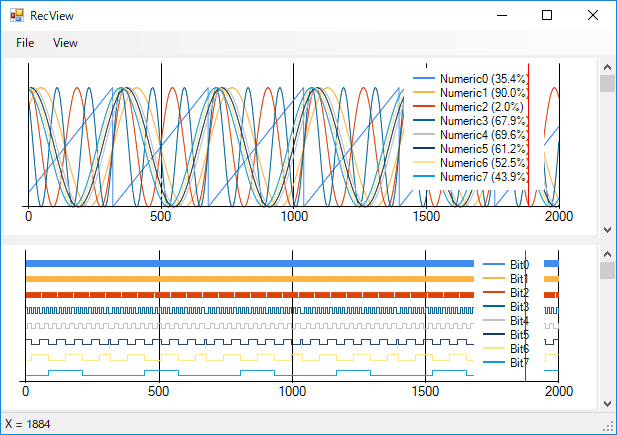
Reading the binary file of a structure saved on the PLC displays analog data at the top of the screen and bit data at the bottom
The loaded data can be converted to a CSV file and saved
FAQ
Which PLCs can it be used with?
It can be used with the OMRON NX series and NJ series.
Where are the files saved?
On the PLC's SD card in binary format.
Can they be converted to CSV?
Yes, data read by the PC application can be converted to CSV format.
What can be recorded?
BOOL data and DINT data can be saved with high-speed sampling.
