
3D
What This Library Can Do
This library provides 3D geometry calculations usable on the OMRON NX/NJ series. It can be used for robot control, vision correction, coordinate transformation, circular interpolation and more.
Samples
 |
 |
 |
 |
 |
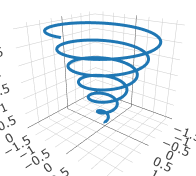 |
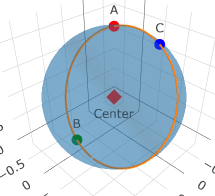
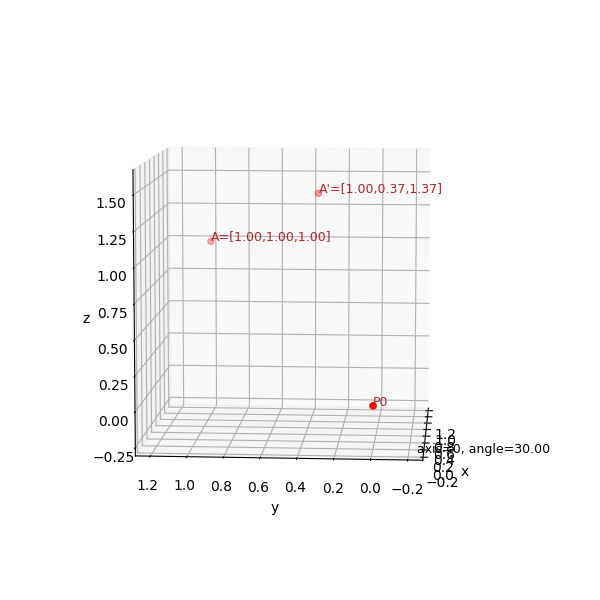
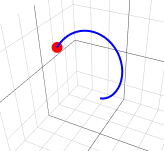
| Distance between two points | Center of the circle through three points | Rotation about XYZ axes | Rotation by Euler angles | Rotation by quaternion | Spiral |
Distance Between Two Points (distance3D)
Calculate the distance between two points in space coordinates

- pointA
- Point A [x,y,z]
- pointB
- Point B [x,y,z]
- distance
- Distance between the two points
Example

- A
- [8, 2, 2]
- B
- [2, 7, 9]
- distance
- 10.488
Formulas
\[ distance = \sqrt{(B_x-A_x)^2+(B_y-A_y)^2+(B_z-A_z)^2} \]
Center of the Circle Through Three Points (getCenter3D)
Calculate the center of the circle through three points in space

- A
- Point A [x,y,z]
- B
- Point B [x,y,z]
- C
- Point C [x,y,z]
- P0
- Center [x,y,z]
Example

- A
- [0, 0, 2]
- B
- [1, 0, 0]
- C
- [0, 1, 2]
- P0
- [0.5, 0.5, 1.0]
Formulas
\begin{align} \overrightarrow{AB}=& \begin{pmatrix} B_x-A_x \\ B_y-A_y \\ B_z-A_z \end{pmatrix} \\ \overrightarrow{AC}=& \begin{pmatrix} C_x-A_x \\ C_y-A_y \\ C_z-A_z \end{pmatrix} \\ \overrightarrow{ABAC}=&\overrightarrow{AB}\times \overrightarrow{AC} \\ \end{align} Solve the system of three linear equations \[ \begin{bmatrix} 2AB_x & 2AB_y & 2AB_z \\ 2AC_x & 2AC_y & 2AC_z \\ ABAC_x & ABAC_y & ABAC_z \end{bmatrix} \begin{bmatrix} x \\ y \\ z \end{bmatrix} = \begin{bmatrix} B^2-A^2 \\ C^2-A^2 \\ ABAC\cdot A \end{bmatrix} \] \(\times \) is the outer product (cross product)
Rotation around the X, Y and Z axes (matRotateXYZ)
Calculate the center of the circle through three points in space
Rotation around the X axis
Rotation around the Y axis
Rotation around the Z axis

- point
- Coordinates before rotation [x,y,z]
- axis
- Rotation axis 0=X 1=Y 2=Z
- angle
- Rotation angle
- out
- Coordinates after rotation [x,y,z]
Example
- point
- [1.2, 0.8, 0.5]
- axis
- 0 (X axis)
- angle
- 270.0
- out
- [1.2, 0.5, -0.8]
Formulas
Around the X axis \[ out= \begin{bmatrix} 1 & 0 & 0 \\ 0 & cos{\theta} & -sin{\theta} \\ 0 & sin{\theta} & cos{\theta} \end{bmatrix} \begin{bmatrix} x \\ y \\ z \\ \end{bmatrix} \] Around the Y axis \[ out= \begin{bmatrix} cos{\theta} & 0 & sin{\theta} \\ 0 & 1 & 0 \\ -sin{\theta} & 0 & cos{\theta} \end{bmatrix} \begin{bmatrix} x \\ y \\ z \\ \end{bmatrix} \] Around the Z axis \[ out= \begin{bmatrix} cos{\theta} & -sin{\theta} & 0 \\ sin{\theta} & cos{\theta} & 0 \\ 0 & 0 & 1 \end{bmatrix} \begin{bmatrix} x \\ y \\ z \\ \end{bmatrix} \]
Rotation by Euler Angles (Euler)
Converts Euler angles to a rotation matrix (EulerToMatrix) and rotates (matRotate3D)

- point
- Coordinates before rotation [x,y,z]
- mat
- Rotation matrix
- out
- Coordinates after rotation [x,y,z]
# This video illustrates the calculation steps; the actual calculation computes the final position directly from the initial position
Example

- EulerAngles
- [30,30,0]
- order
- XYZ
- mat
- Matrices
- point
- [1.0, 1.0, 1.0]
- mat
- Matrices
- out
- [1.37, 0.68, 0.82]
Formulas
\[ out= \begin{bmatrix} m00 & m01 & m02 \\ m10 & m11 & m12 \\ m20 & m21 & m22 \end{bmatrix} \begin{bmatrix} x \\ y \\ z \\ \end{bmatrix} \]
Rotation with quaternions (qtRotate)

- vector
- Rotation axis (unit vector) [x,y,z]
- point
- Coordinates before rotation [x,y,z]
- angle
- Rotation angle
- out
- Coordinates after rotation [x,y,z]
Example
- vector
- [-0.2, 1.0, 1.0]
- point
- [1.2, 1.0, 0.5]
- angle
- 270.0
- out
- [0.227, -0.293, 1.598]
Formulas
Original vector
\[
Q1=
\begin{bmatrix}
q_w \\
q_x \\
q_y \\
q_z \\
\end{bmatrix}
=
\begin{bmatrix}
0 \\
x \\
y \\
z \\
\end{bmatrix}
=
\begin{bmatrix}
0 \\
point.x \\
point.y \\
point.z \\
\end{bmatrix}
\]
Rotation axis (unit vector)
\[
T=
\begin{bmatrix}
vector.x \\
vector.y \\
vector.z \\
\end{bmatrix}
\]
Quaternion representing the rotation
\[
R=
\begin{bmatrix}
q_w \\
q_x \\
q_y \\
q_z \\
\end{bmatrix}
=
\begin{bmatrix}
cos\frac{\theta}{2} \\
sin\frac{\theta}{2} T_x \\
sin\frac{\theta}{2} T_y \\
sin\frac{\theta}{2} T_z \\
\end{bmatrix}
\]
Rotation calculation
\[
out = R \times Q1 \times \bar{R}
\]
Spiral (spiral)
- angle
- Rotation angle
- dx
- Distance in the X direction added per revolution
- dz
- Distance in the Z direction added per revolution
- stype
- Type
- out
- Coordinates after rotation [x,y,z]
Example
Coil
An example of finding the coordinates of a coil shape with radius 10 that rises 10 along the Z axis per turn
Calculating from 0 to 1800 degrees draws the "Coil" shape above

- angle
- 0 to 1800
- dx
- 10.0
- dz
- 10.0
- stype
- 0
- out
- Coordinates for 0-1800 degrees [x,y,z]
-
Spiral spreading at equal intervals
Changing stype in the [Example: Coil] above to 1 draws the "Equally spaced" shape - Spiral spreading by square root
Changing stype in the [Example: Coil] above to 2 draws the "Square root" shape - Spiral spreading exponentially
Changing stype in the [Example: Coil] above to 3 draws the "Exponential" shape
Formulas
\begin{align} \theta = \frac{\pi}{180} \times Angle \\ r= \frac{dx}{360} \\ h= \frac{dz}{360} \end{align} Coil \begin{align} x= r \times \cos\theta \\ y= r \times \sin\theta \\ z= h \times Angle \end{align} Equally spaced \begin{align} x= r\theta \times cos\theta \\ y= r\theta \times sin\theta \\ z = h \times Angle \end{align} Square root \begin{align} x= r \sqrt{\theta} \times cos\theta \\ y= r \sqrt{\theta} \times sin\theta \\ z = h \times Angle \end{align} Exponential \begin{align} a= 1.1 \\ x= r \times a^{\theta} \times cos\theta \\ y= r \times a^{\theta} \times sin\theta \\ z = h \times Angle \end{align}
FAQ
What can this library do?
It provides 3D geometry calculations usable on the OMRON NX/NJ series, including distance, the center of a circle through three points, rotation matrices, Euler angles, quaternions and spiral coordinates.
What applications can it be used for?
3D coordinate calculations such as robot control, vision correction, coordinate transformation and circular interpolation.