
日本語
English
SimpleJSON Library Usage Example
Explains the steps for reading a JSON file, converting it to a Dictionary with the Deserialize function and getting values from keys.
Overview
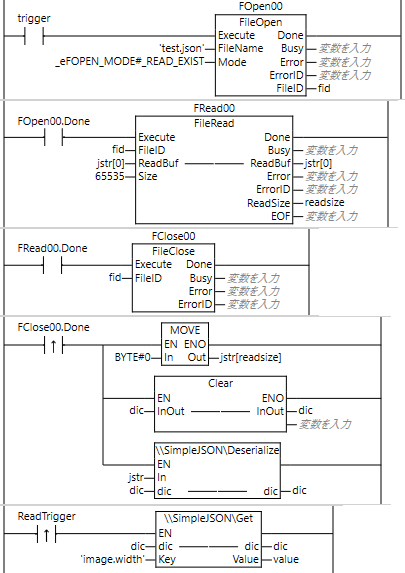
Turning the trigger flag ON reads the JSON file and converts it to a Dictionary
Turning the ReadTrigger flag ON reads the value of the Key
Circuit
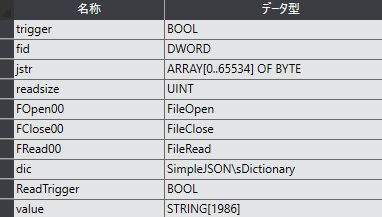
Variables
Ladder logic
File (test.json)
Result
- Turn Trigger ON to read the file
- The read file is stored in a dictionary with the Deserialize instruction
- Turning ReadTrigger ON reads the value of the image.width key
- The value "800" of the image.width key is obtained
FAQ
Can nested JSON be handled?
Yes. It is saved as dot-separated keys such as image.Thumbnail.Url.
Can arrays be handled?
JSON arrays can also be retrieved. In the example, the IDs array is saved.
Can Japanese key names be used?
UTF-8 is supported, so keys containing kanji can be handled.