
How to INSERT Data into MySQL
Explains how to INSERT PLC data into a MySQL database using the DB connection function of the OMRON NX/NJ series.
Using DB_Connect, DB_CreateMapping and DB_Insert, equipment data and production results can be saved to a database.

How to create the MySQL table
Create a table in MySQL
Create a table named wx_data
Create the table by running the following SQL on the mysql command line or as a query in MySQL Workbench
| sample_time | device_id | device_data |
|---|---|---|
| ... | ... | ... |
Creating the PLC program
DB connection settings
Settings for connecting to the DB
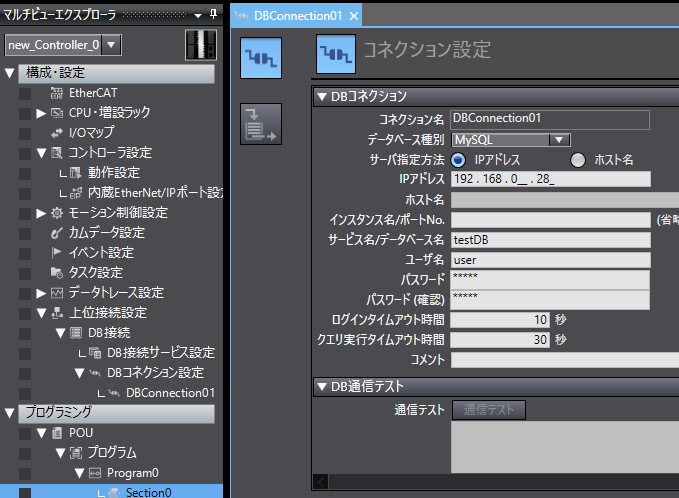
Add a connection setting named "DBConnection01" under "DB Connection Settings" below DB Connection in the host connection settings
Select MySQL as the database type, set the IP address of the DB server and the database name, and set the user name and password for connecting to that DB
Ladder logic
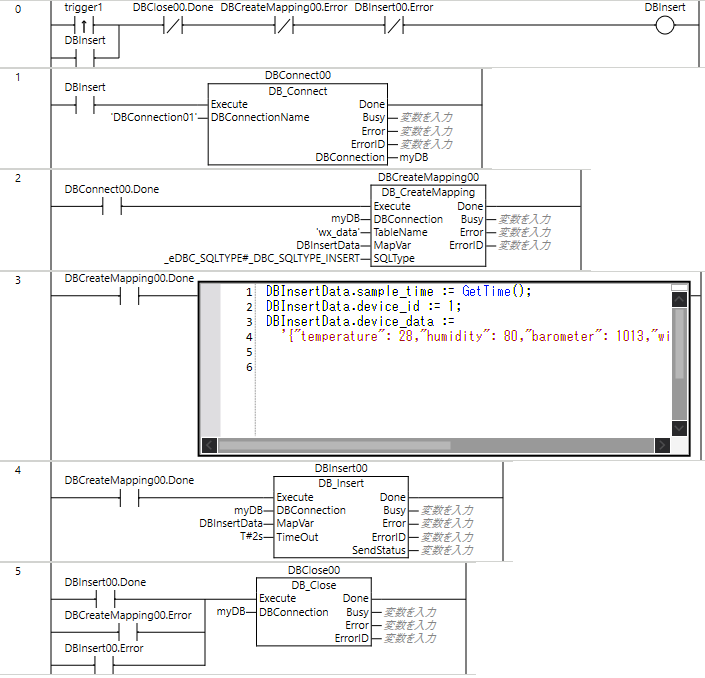
- Turn Trigger1 ON to turn ON the DBInsert executing flag
- Connect to the DB with DB_Connect
For DBConnectionName, enter "DBConnection01" created in the DBConnection settings - Associate the structure (DBInsertData) with the table (wx_data) as the Insert type with DB_CreateMapping
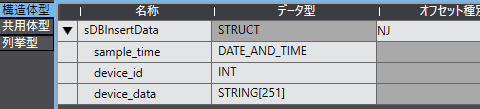
Make the structure match the table as follows
- Set the data to add to the table
- Execute DB_Insert to add the data
- When processing completes, close the connection to the DB with DB_Close
Also close it when an error occurs in the Mapping or Insert instruction
Checking the data in the DB
Check on the MySQL command line
Frequently Asked Questions (FAQ)
Can it connect to databases other than MySQL?
Yes, any supported DB such as PostgreSQL or SQL Server.
Can it be used with models other than the NX102?
Yes, with NX/NJ series models that support the DB connection function.
What if DB_Insert returns an error?
Check the DB connection settings, user permissions and table definition.
