
KEYENCE Host Link communication
Overview
Host Link communication commands, KEYENCE's communication protocol
I created a class for message communication with a PLC from Python using an Ethernet UDP/IP socket
Operating environment
Tested environment: Win10
python3.9
PLC KEYENCE KV8000
Configuration
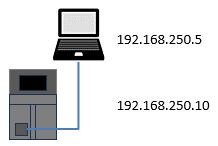
Installation
> pip install kvhostlink-udp
Function List
| Methods | Description |
|---|---|
| mode | Change mode |
| unittype | Inquire model |
| errclr | Clear error |
| er | Check error number |
| settime | Set time |
| set | Force set |
| reset | Force reset |
| sts | Continuous force set |
| rss | Continuous force reset |
| read | Read data |
| reads | Read consecutive data |
| write | Write data |
| writes | Write consecutive data |
| mws | Monitor registration (word) |
| mwr | Monitor read (words) |
Creating the object
kvhostlink(host)
| host | Destination address |
|---|
Return value
| Return value | kvhostlink object |
|---|
Example
kv = kvHostLink('192.168.250.10')
The kvHostLink class creates an object with the IP address of the communication partner
Methods
mode(mode)
Change mode
Switches the CPU unit to PROGRAM mode or RUN mode
| mode | 0=PROGRAM, 1=RUN |
|---|
Return value
| Return value | OK\r\n |
|---|
\r\n is CR LF
Example
data = kv.mode('1')
unittype()
Model inquiry
Checks the PLC model
| Return value | Model number\r\n |
|---|
| Model number | Model |
|---|---|
| 57 | KV-8000 |
| 58 | KV-8000A |
| 54 | KV-7300 |
| 55 | KV-7500 |
| 51 | KV-3000 |
| 52 | KV-5000 |
| 53 | KV-5500 |
| 128 | KV-NC32T |
| 132 | KV-N60?? |
| 133 | KV-N40?? |
| 134 | KV-N24?? |
Example
data = kv.unittype()
errclr()
Clear error
Clears the error occurring in the CPU unit
Example
data = kv.errclr()
er()
Check error number
Checks errors and faults occurring in the CPU unit
| Return value | Error number\r\n |
|---|
Example
data = kv.er()
settime()
Set time
Writes the sender's time to the CPU unit clock
Example
data = kv.settime()
set(address)
Force set
Forcibly turns ON the contact of the specified device
Example
data = kv.set('MR0')
reset(address)
Force reset
Forcibly turns OFF the contact of the specified device
Example
data = kv.reset('MR1')
sts(address, num)
Continuous force set
Forcibly turns ON the contacts of the specified number of devices
| address | Device number |
|---|---|
| num | Number to write |
Example
data = kv.sts('MR10', 5)
rss(address, num)
Continuous force reset
Forcibly turns OFF the contacts of the specified number of devices
| address | Device number |
|---|---|
| num | Number to write |
Example
data = kv.rss('MR10', 4)
read(address)
Read data
Reads one data item from the specified device
| address | Device number |
|---|
Example
# Read clock information
rcv = finsudp.Clock()
reads(address, num)
Read consecutive data
Reads data from the specified number of devices continuously
| address | Device number |
|---|---|
| num | Number to read |
Example
data = kv.reads('DM0.S', 4)
write(address, data)
Write data
Writes data to the specified device
| address | Device number |
|---|---|
| data | Write data |
Example
data = kv.write('DM0.U', '2')
writs(address, num, data)
Write consecutive data
Writes the specified number of data items continuously
| address | Device number |
|---|---|
| num | Number to write |
| data | Write data (space-separated) |
Example
data = kv.writs('DM1.S', 4, '1 2 3 4')
mws(address)
Register monitor
Registers the specified devices in the word device registration table (MWS)
| address | Device numbers (space-separated) |
|---|
Example
data = kv.mws('DM0.H DM1.S DM2.L DM4.U DM5.D')
mwr()
Read monitor
Reads the values of the devices in the device registration table
Example
data = kv.mwr()
Example
from kvhostlink import kvHostLink

try:
	kv = kvHostLink('192.168.250.32')
	data = kv.mode('1')
	print(data)						# b'OK\r\n'
	data = kv.unittype()
	print(data)						# b'57\r\n'
	data = kv.errclr()
	print(data)						# b'OK\r\n'
	data = kv.er()
	print(data)						# b'000\r\n'
	data = kv.settime()
	print(data)						# b'OK\r\n'
	data = kv.set('MR0')
	print(data)						# b'OK\r\n'
	data = kv.reset('MR1')
	print(data)						# b'OK\r\n'
	data = kv.sts('MR10', 5)
	print(data)						# b'OK\r\n'
	data = kv.rss('MR10', 4)
	print(data)						# b'OK\r\n'
	data = kv.read('DM0.U')
	print(data)						# b'00002\r\n'
	data = kv.reads('DM0.S', 4)
	print(data)						# b'+00002 +00001 +00002 +00003\r\n'
	data = kv.write('DM0.U', '2')
	print(data)						# b'OK\r\n'
	data = kv.writs('DM1.S', 4, '1 2 3 4')
	print(data)						# b'OK\r\n'
	data = kv.mws('DM0.H DM1.S DM2.L DM4.U DM5.D')
	print(data)						# b'OK\r\n'
	data = kv.mwr()
	print(data)						# b'0002 +00001 +0000196610 00004 0605955594\r\n'

except Exception as e:
	print(e)
Related pages
Qiita article (Japanese)
 KEYENCE Host Link communication
 kvHostLink