
 ComCom2026: TCP and UDP Communication Test Tool
Overview
ComCom2026 is a Windows communication test tool for testing TCP and UDP send/receive.
It can be used to check communication with PLCs, industrial devices and IoT devices, and to debug CIP, FINS, MC protocol and Modbus TCP.
You can send any byte sequence or string, check received data and record communication logs. It is useful for checking communication with PLCs and industrial devices.
Main Features
- TCP communication testing
- UDP communication testing
- Send/receive log display
- Periodic sending
- Message list management
- Temporary storage of received data
- PLC communication debugging
- Industrial protocol testing
Bundled protocols
- CIP
- FINS
- MC protocol
- Modbus TCP
- KV Host Link
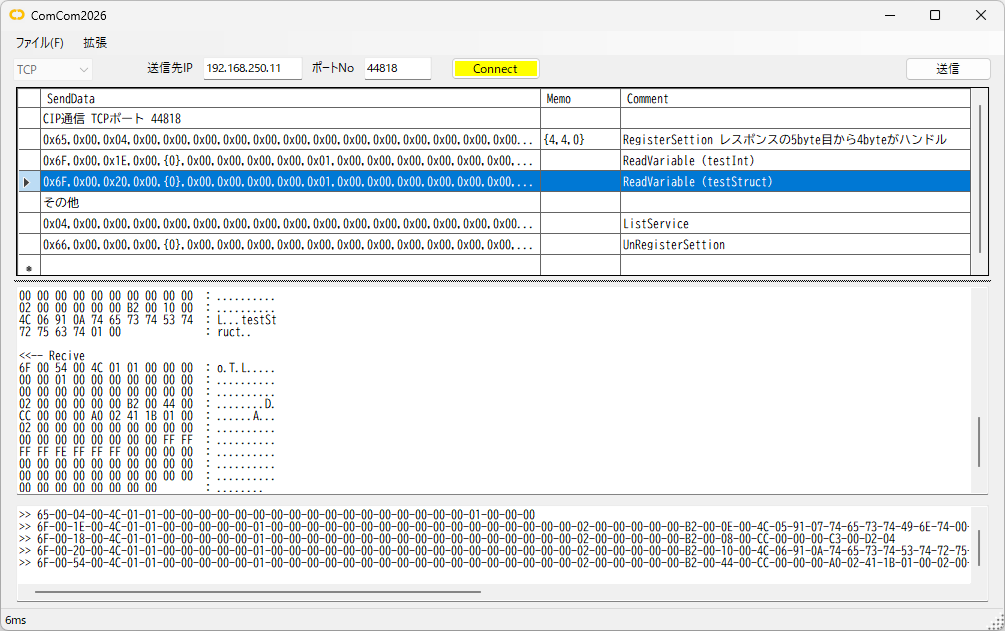
ComCom2026 screen
Tested on: Win11
Framework: .NET 10.0
How to Use
Protocol
Select UDP or TCP
Destination IP, destination port No.
Enter the destination IP address and port number
Send message list
| SendData |
The format of the send data is - separate bytes with commas (,) - decimal values as-is, 0-255 - hexadecimal values with 0x, 00-FF - enclose strings in "" |
| Variable |
Stores part of the received data in a memo for temporary storage There are 10 memos, numbered 0-9, each up to 10 bytes {start position, number of bytes, memo number} |
| Comment | Comment |
[Send]
Sends the message on the selected line
Send/receive history
Shows sent and received data
Menu bar
File (F) - Open send list
Loads a list file
File (F) - Save send list
Saves the list file
File (F) - Save send/receive history
Saves the send/receive history
Memo list
Shows what is stored in the memos
Extensions (X) - Start periodic send
Sends the send data message periodically
Extensions (X) - Stop periodic send
Stops periodic sending
Extensions (X) - Period...
Shows a dialog to set the periodic interval
Communication Examples by Protocol
Examples of communicating using the bundled send lists
CIP communication (cip.txt)
- Open the bundled cip.txt with [File (F)] - [Open send list]
- Set the destination IP and port number (44818) and press the [Connect] button to connect
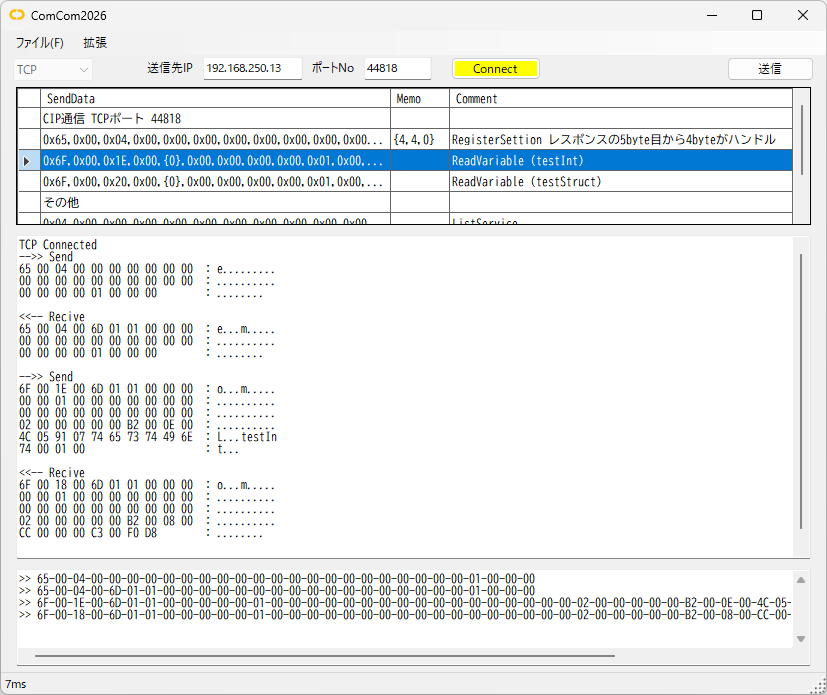
- Double-click or select 0x65,0x00,0x04,0x00... on line 2 of the send list and press the [Send] button
- The communication is shown in the send/receive history
- Next, double-click or select 0x6F,0x00,0x1E,0x00,{0}... on line 3 of the send list and press the [Send] button
(this sends a command that includes the handle received on line 2) - The command on line 3 sends a ReadVariable command that reads the value of the variable "testInt"
- The communication is shown in the send/receive history
The last 4 bytes, C3 00 D8 F0, are the variable's value
(C3 00 is the INT type, D8 F0 is -10000 in decimal)
FINS UDP communication (fins.txt)
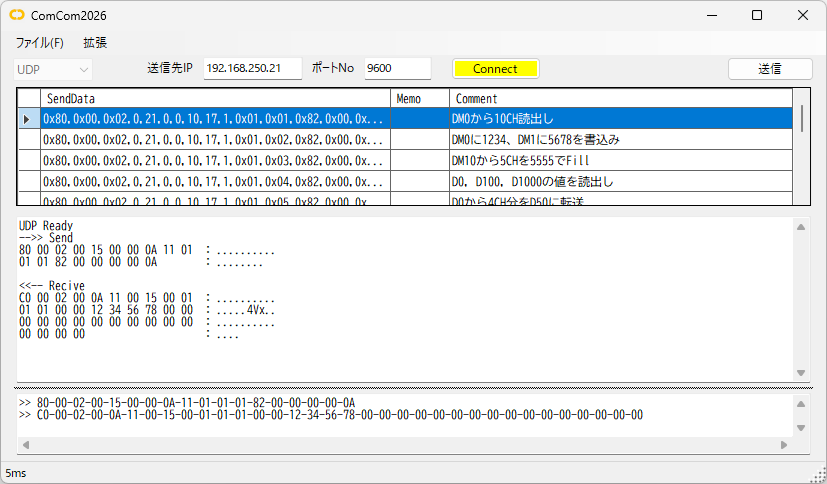
The FINS addresses are 0.10.17 for the PC and 0.21.0 for the PLC
- Open the bundled fins.txt with [File (F)] - [Open send list]
- Set the destination IP and port number (9600) and press the [Connect] button to connect
-
Double-click or select 0x80,0x00,0x02,0,21,0,0,10,17,1,0x01,0x01,0x82... on line 2 of the send list and press the [Send] button
This sends a memory area read (01 01) command that reads 10 words from D0 -
The communication is shown in the send/receive history
From byte 11, 01 01 is the command, 00 00 is normal completion, and the data follows: 12 34 56 78 ....
FINS TCP communication (finsTCP.txt)
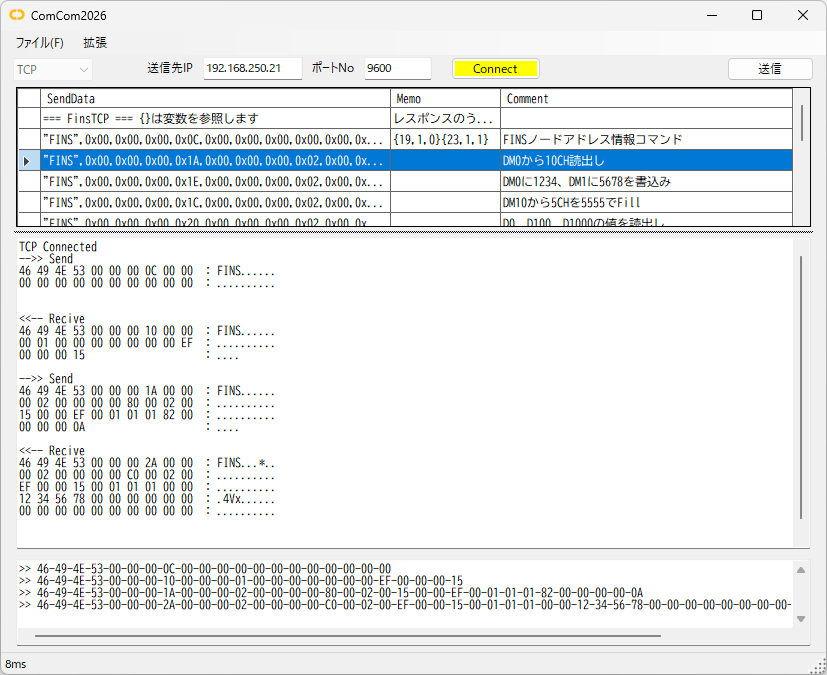
- Open the bundled finsTCP.txt with [File (F)] - [Open send list]
- Set the destination IP and port number (9600) and press the [Connect] button to connect
- Double-click or select "FINS",0x00,0x00,0x00,0x0C... on line 2 of the send list and press the [Send] button
- The communication is shown in the send/receive history
-
Next, double-click or select "FINS",0x00,0x00,0x00,0x1A... on line 3 of the send list and press the [Send] button
(this sends a command that includes the node address received on line 2)
The command on line 3 is a memory area read (01 01) command that reads 10 words from D0 -
The communication is shown in the send/receive history
From byte 27, 01 01 is the command, 00 00 is normal completion, and the data follows: 12 34 56 78 ....
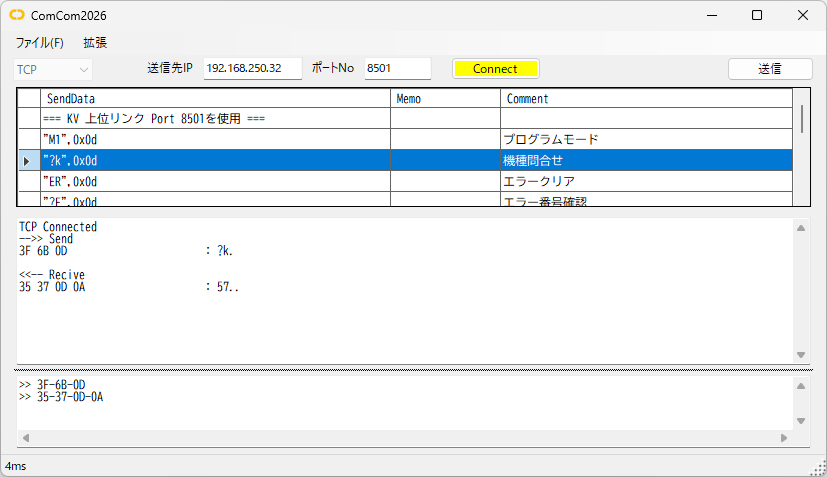
KV Host Link communication (kv_host.txt)
- Open the bundled kv_host.txt with [File (F)] - [Open send list]
- Set the destination IP and port number (8501) and press the [Connect] button to connect
-
Double-click or select "?k",0x0d on line 3 of the send list and press the [Send] button
This sends the "model inquiry" command -
The communication is shown in the send/receive history
35 37 0D 0A : 57..
'57' means KV-8000
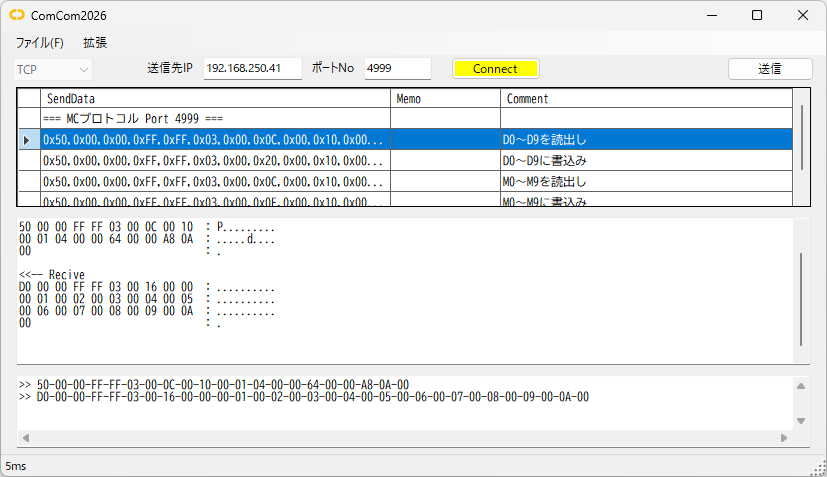
MC protocol communication (mcprotocol.txt)
- Open the bundled mcprotocol.txt with [File (F)] - [Open send list]
- Set the destination IP and port number (4999) and press the [Connect] button to connect
-
Double-click or select 0x50,0x00,0x00,0xFF,0xFF,0x03,0x00,0x0C... on line 2 of the send list and press the [Send] button
This sends a command that reads 10 words from D0 -
The communication is shown in the send/receive history
The read data starts at byte 12: 01 00 02 00 03 00 ...
FAQ
Is ComCom2026 free?
Yes, it is free to use.
Which communication methods are supported?
TCP and UDP communication are supported.
Which protocols are supported?
CIP, FINS, MC protocol, Modbus TCP and KV Host Link are supported.
Can it send periodically?
It can repeatedly send data at any interval.
Related pages
- OMRON CIP Message Communication (UCMM)
- OMRON Variable Access with CIP Explicit Messages
- OMRON CIP Object List
- KEYENCE CIP Object List
- OMRON FINS Message Communication
Related tools

ComEmulator
When connecting a PLC to an external device via RS-232C or Ethernet, you can emulate the external device on a PC before connecting it

CipMes
An application that sends CIP messages using Ethernet socket communication

FinsMes
An application that sends FINS messages using Ethernet socket communication
Download
By downloading, you are deemed to have agreed to the Terms of Use
The following send list files are included
- CIP commands (cip.txt)
- FINS-UDP commands (fins.txt)
- FINS-TCP commands (finsTCP.txt)
- KV Host Link commands (kv_host.txt)
- MC protocol (mcprotocol.txt)
- Modbus-TCP commands (modbus_tcp.txt)