
Mitsubishi MELSEC MC Protocol Communication with Python
Overview
Reads and writes device values from Python using the MC protocol, the communication protocol of Mitsubishi PLCs
Operating environment
Tested environment: Win10
python3.9
MITSUBISHI MC Protocol Frame3E UDP/IP Connection
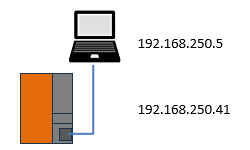
Configuration
Installation
> pip install mcprotocol-udp
Method list
| Methods | Description |
|---|---|
| read | Read memory area |
| write | Write memory area |
| RandomRead | Read non-consecutive devices |
| MonitorSet | Register devices to monitor |
| MonitorGet | Read the values of registered devices |
Creating the object
MCProtcol3E(IPAddress, Port)
| IPAddress | Destination IP address |
|---|---|
| Port | Destination port number |
Return value
| Return value | MCProtcol3E object |
|---|
Example
mcp = MCProtcol3E('192.168.0.41', 4999)
Methods
read(memAddres, size, unitOfBit)
Read memory area
| memAddres | Memory address |
|---|---|
| size | Number of points to read |
| unitOfBit | True = bit units, False = word units |
Return value
| Return value | Read data (byte array) |
|---|
Convert the read data with the data conversion methods
Supported memory addresses
X, Y, M, L, F, V, B, D, W, TS, TC, TN, SS, SC, SN, CS, CC, CN, SB, SW, S ,DX, DY, SM, SD
Example
# bit units
data = mcp.read('M0', 8, True)
# word units
data = mcp.read('D0', 1, False)
write(memAddres, data, bitSize)
Write memory area
| memAddres | Memory address |
|---|---|
| data | Write data (byte array) |
| bitSize | Number of bits (specify only when writing in bit units) |
Return value
| Return value | 00 00 (normal completion) |
|---|
Supported memory addresses
X, Y, M, L, F, V, B, D, W, TS, TC, TN, SS, SC, SN, CS, CC, CN, SB, SW, S ,DX, DY, SM, SD
Example
# Write data from D0
rcv = mcp.write('D0', data)
RandomRead(worddevice, dworddevice)
Read non-consecutive devices
| worddevice | Word read addresses (comma-separated) |
|---|---|
| dworddevice | Double word read addresses (comma-separated) |
Return value
| Return value | Read data (byte array) |
|---|
Supported memory addresses
X, Y, M, L, F, V, B, D, W, TN, SN, CN, SB, SW, S ,DX, DY, SM, SD
Example
rcv = mcp.RandomRead('D0,TN0,M100,X20', 'D1500,Y160,M1111')
MonitorSet(worddevice, dworddevice)
Register devices to monitor
| worddevice | Word read addresses (comma-separated) |
|---|---|
| dworddevice | Double word read addresses (comma-separated) |
Return value
| Return value | 00 00 (normal completion) |
|---|
Supported memory addresses
X, Y, M, L, F, V, B, D, W, TN, SN, CN, SB, SW, S ,DX, DY, SM, SD
Example
rcv = mcp.MonitorSet('D50, D55', 'D60, D64')
MonitorGet()
Read the values of registered devices
| Return value | Read data (byte array) |
|---|
Supported memory addresses
X, Y, M, L, F, V, B, D, W, TN, SN, CN, SB, SW, S ,DX, DY, SM, SD
Example
rcv = mcp.MonitorGet()
Data conversion methods
Example
print(mcp.toInt16(data))
Methods for converting the received bytes
The method to use depends on what kind of data the bytes contain
| Method name | Length of data to convert |
|---|---|
| toBin | Bit string |
| WordtoBin | Bit string in 16-bit units |
| toInt16 | 16-bit number |
| toUInt16 | 16-bit unsigned |
| toInt32 | 32-bit number |
| toUInt32 | 32-bit unsigned |
| toInt64 | 64-bit number |
| toUInt64 | 64-bit unsigned |
| toFloat | Floating point |
| toDouble | Double precision |
| toString | String |
Example
from mcprotocol import MCProtcol3E
import struct

'''
# Uncomment if you need the MCProtocol send/receive log
import logging

logging.basicConfig(
	filename="mcp.log",
	level=logging.DEBUG,
	format="%(asctime)s [%(levelname)s] %(name)s: %(message)s"
)
'''

try:
	# set IPAddress,Port
	mcp = MCProtcol3E('192.168.250.41', 4999)

	# words
	data = mcp.read('D10000', 1)
	print(mcp.toInt16(data))        # convert int16    out> [0]
	rcv = mcp.write('D10', data)
	print(rcv)                      # normal recieve  out> b'\x00\x00'

	# bits
	#data = mcp.read('M8000', 8, True)
	data = mcp.read('M0', 16, True)
	print(data)                     # out> b'\x00\x00\x00\x00\x00\x00\x00\x00
	print(mcp.toBin(data))          # out> 0000000000000000
	rcv = mcp.write('M100', data, 8)
	print(rcv)                      # out> b'\x00\x00'

	data = mcp.read('D0', 1, False)
	print(mcp.WordToBin(data))      # out> 0000000000000000

	# numeric
	data = struct.pack('hhh', 123, 456, 789)
	rcv = mcp.write('D20', data)
	print(rcv)                      # out> b'\x00\x00'
	# float
	data = struct.pack('f', 1.23)
	rcv = mcp.write('D10020', data)
	print(rcv)                      # out> b'\x00\x00'
	# bits
	data = [0x11, 0x11, 0x10]
	rcv = mcp.write('M8100', data, 5)

	# RandomRead
	rcv = mcp.RandomRead('D0,TN0,M100,X20', 'D1500,Y160,M1111')
	print(rcv)                      # out> b'\x00\x00\x00\x00\x00\x00\x00\x00\x00\x00\x00\x00\x00\x00\x00\x00\x00\x00\x00\x00'
	print(mcp.toInt16(rcv[:8]))     # out> [0, 0, 0, 0]
	print(mcp.toInt32(rcv[8:]))     # out> [0, 0, 0]

	# Monitor
	data = mcp.MonitorSet('D50, D55', 'D60, D64')
	rcv = mcp.MonitorGet()
	print(mcp.toInt16(rcv[:4]))    # out> [50, 55]
	print(mcp.toInt32(rcv[4:]))    # out> [3997756, 4259904]

except Exception as e:
    print(e)
Related pages
Qiita article (Japanese)
 Sending the Mitsubishi MELSEC MC protocol with Python
 MC-Protocol