
- KVKV-X
X-bar R control chart
Overview
Analyzes quality variation based on decision rules
A few samples are taken as one subgroup, and subgroups are taken multiple times to create the X-bar R control chart
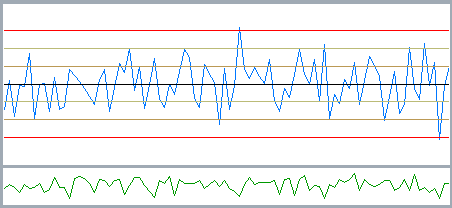
The upper graph shows the X-bar chart (blue)
The blue line is the average of each subgroup; 90 subgroups are shown
The upper control limit (UCL) and lower control limit (LCL) are calculated around the average of the 90 subgroups and divided into three zones
The lower graph shows the R chart (green)
The R chart shows the difference between the maximum and minimum values (variation) within each subgroup
Difference Between the X-bar R Control Chart and Cpk
The X-bar R control chart and Cpk are both used in quality control, but their purposes differ. The X-bar R control chart is a technique for monitoring whether a process is operating in a stable state. It records data continuously during production and detects variation beyond the control limits or abnormal trends. When a process fault occurs, the control chart decision rules allow it to be found early. Cpk (process capability index), on the other hand, is a metric for evaluating whether a process is capable of meeting the specifications. It takes into account the process variation and any offset of the mean, and expresses numerically the likelihood of out-of-spec products. In typical quality control, you first confirm with an X-bar R control chart that the process is in statistical control, then calculate Cpk to evaluate process capability. Cpk calculated while the process is unstable is unreliable, so it is important to combine control chart monitoring with process capability evaluation.
| Item | X-bar R control chart | Cpk |
|---|---|---|
| Purpose | Detecting process faults | Evaluating process capability |
| What is evaluated | Variation over time | Margin relative to the specification |
| When used | Monitoring during production | When evaluating process capability |
| Result | Judgment of the control state | Capability index (numeric) |
| Fault detection | Possible | Not possible |
Simply put, the X-bar R control chart is "a tool for seeing whether the process is stable," and Cpk is "a metric for evaluating whether the process is capable of meeting the specifications."
Related pages
Calculation
Calculate the subgroup average \(\bar{x}\) and the range R as maximum minus minimum
Calculate the average of all subgroup averages \(\bar{\bar{x}}\) and the average range
Calculate the UCL and LCL of the X-bar chart
\begin{align}
UCL = \bar{\bar{x}} + A_{2}\bar{R} \\
LCL = \bar{\bar{x}} - A_{2}\bar{R} \\
\end{align}
Calculate the UCL and LCL of the R chart
\begin{align}
UCL = D_{4} \times \bar{R} \\
LCL = D_{3} \times \bar{R} \\
\end{align}
| Subgroup size | A2 | D3 | D4 |
|---|---|---|---|
| 2 | 1.880 | 0.0 | 3.267 |
| 3 | 1.023 | 0.0 | 2.574 |
| 4 | 0.729 | 0.0 | 2.282 |
| 5 | 0.577 | 0.0 | 2.114 |
| 6 | 0.483 | 0.0 | 2.004 |
| 7 | 0.419 | 0.076 | 1.924 |
| 8 | 0.373 | 0.136 | 1.864 |
| 9 | 0.337 | 0.184 | 1.816 |
| 10 | 0.308 | 0.223 | 1.777 |
Control Chart Decision Rules (JIS Z 9021)
JIS Z 9021:1998 defines the following decision rules as guidelines
Even if all points are within the control limits, the process may have an abnormal trend. Therefore JIS defines eight rules that look not only at the control limits but also at consecutive trends, periodicity and so on.
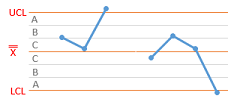
Rule 1: one point beyond zone A
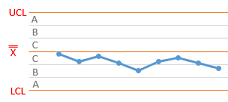
Rule 2: nine points in a row on the same side of the center line
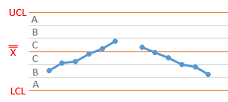
Rule 3: six points in a row steadily increasing or decreasing
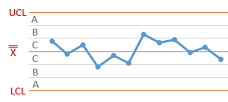
Rule 4: fourteen points in a row alternating up and down
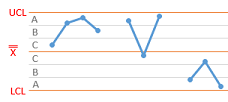
Rule 5: two out of three consecutive points in zone A or beyond
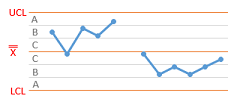
Rule 6: four out of five consecutive points in zone B or beyond
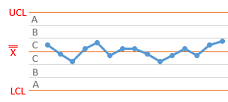
Rule 7: fifteen consecutive points in zone C
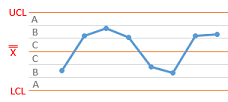
Rule 8: eight consecutive points beyond zone C
Symbols
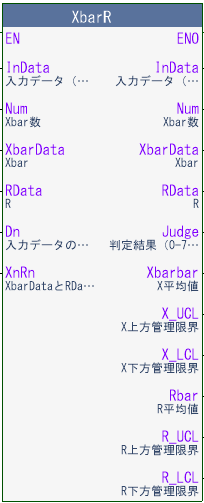
- InData[]
- Input data
- Num
- Number of data inputs
- Xbardata[]
- Xbar
- Rdata[]
- R
- Dn
- Number of samples per subgroup
- XnRn
- Number of subgroups to keep (max. 90)
- Judge
- Judgment result (bits 0-7 correspond to rules 1-8)
- Xbarbar
- X average
- X_UCL
- X upper control limit
- X_LCL
- X lower control limit
- Rbar
- R average
- R_UCL
- R upper control limit
- R_LCL
- R lower control limit
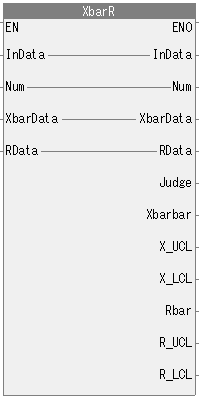
- InData[]
- Input data
- Num
- Number of data inputs
- Xbardata[]
- Xbar
- Rdata[]
- R
- Judge
- Judgment result (bits 0-7 correspond to rules 1-8)
- Xbarbar
- X average
- X_UCL
- X upper control limit
- X_LCL
- X lower control limit
- Rbar
- R average
- R_UCL
- R upper control limit
- R_LCL
- R lower control limit
Test circuit
Ladder logic
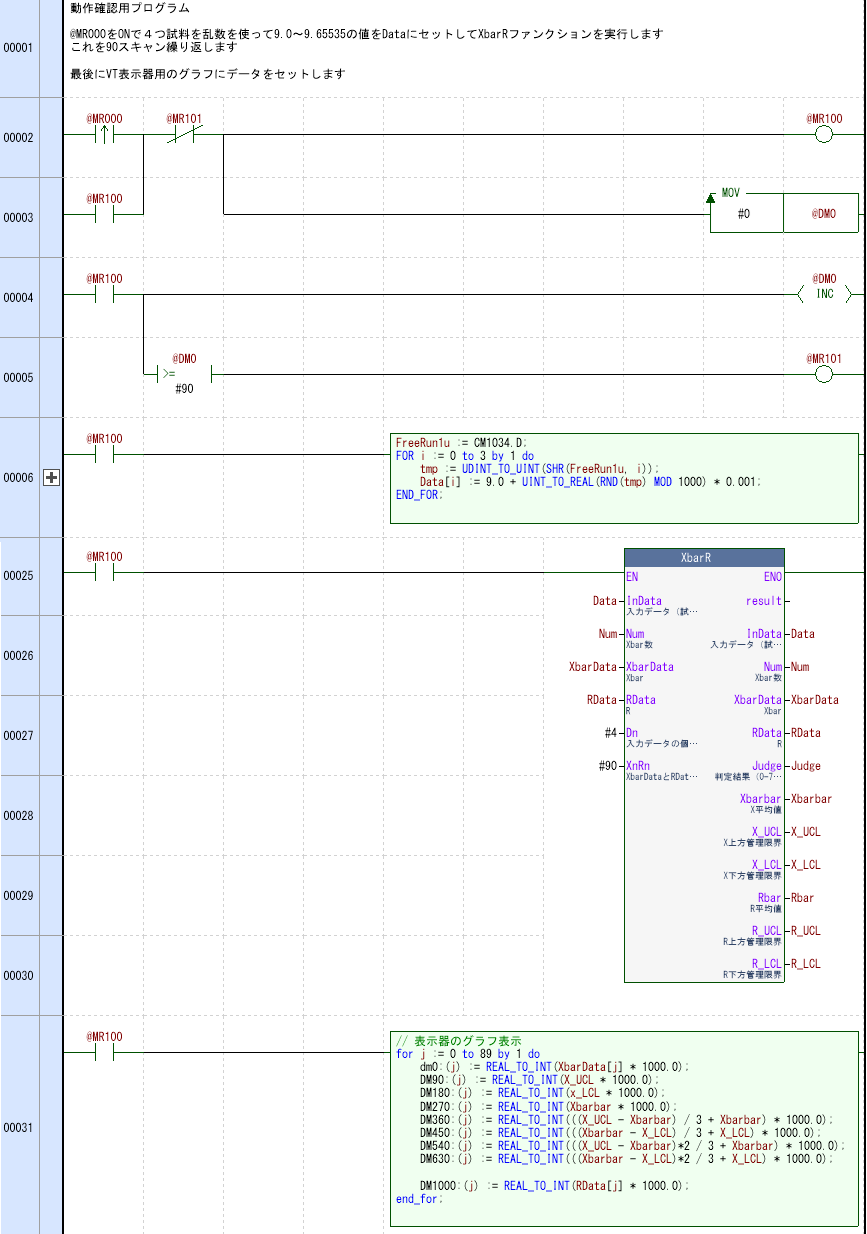
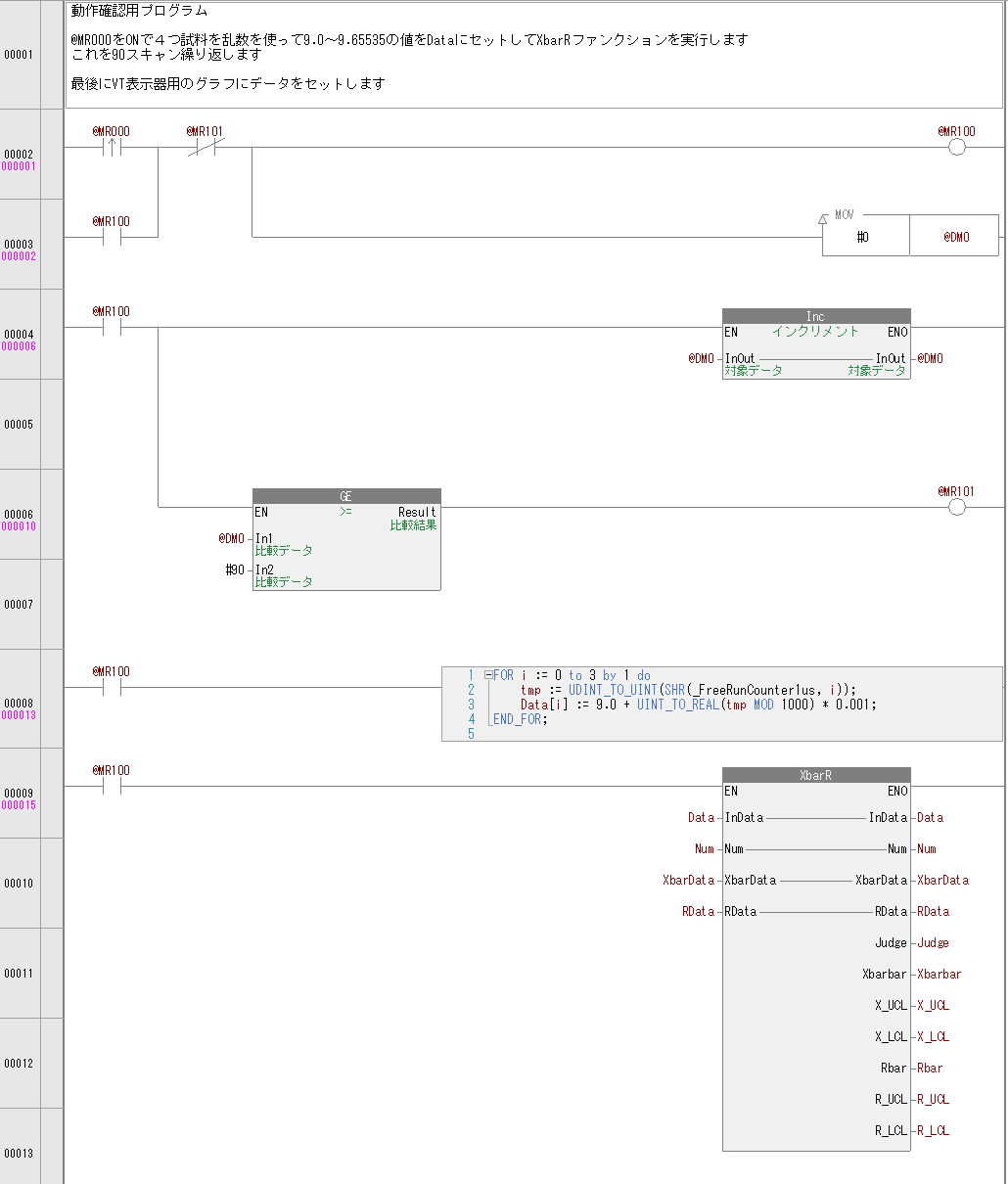
When the @MR000 contact turns ON, sample values from 9.0 to 9.65535 are generated with random numbers, set into Data[], and the XbarR function is executed
This sample creates the control chart with random numbers, but in practice you can input inspection data such as dimensional measurements, weight, temperature and pressure for quality control.
The calculated values are appended to XbarData and RData, and the judgment result, Xbarbar and so on are output
At the same time, the execution count is incremented and output to Num
The in-out variables Num, XbarData and RData are used inside the FUN, so do not change them
To clear the data, clear Num, XbarData and RData
Also, values such as Xbarbar are calculated from XbarData and RData, so they are not stable until enough data accumulates
Download


By downloading, you are deemed to have agreed to the Terms of Use
By downloading, you are deemed to have agreed to the Terms of Use