
Logging with a Ring Buffer
Benefits of using a ring buffer
- Prevents data loss caused by waiting for SD card writes
- Enables high-speed sampling
- Keeps the task period stable
- Absorbs temporary write delays
How to think about the collection period
SD card write times are not constant.
Therefore a configuration that collects data every 1 ms while running write processing every 100 ms is effective.
How Ring Buffer Logging Works
Structure data is temporarily stored in the ring buffer
When writing to the SD card, data is read from the ring buffer and written
SD card write times vary, so providing a buffer as a cushion allows a shorter collection period
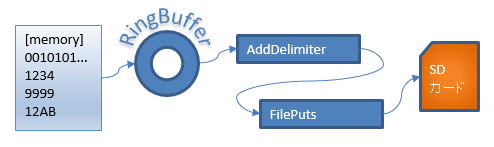
Function blocks used
Uses the ring buffer functions
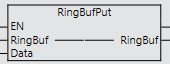
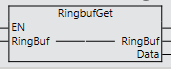
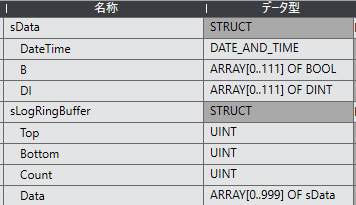
Structure for logging
Ladder program example
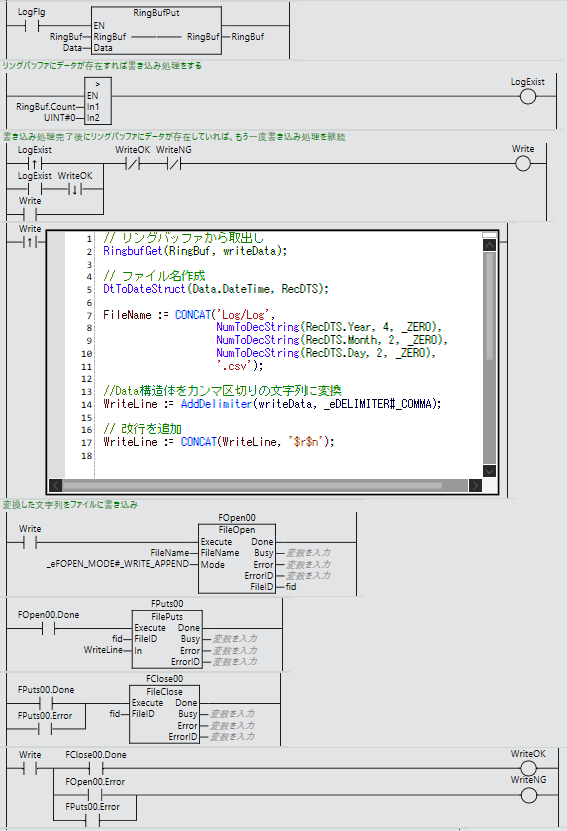
SD card write processing
When the LogFlg contact turns ON, the RingBufPut function stores data in the ring bufferWhen the ring buffer count becomes greater than 0 (LogExist ON), data is read from the ring buffer and the file write processing runs
The write processing is the same as "The simplest logging", but processing is added to run the write again if the ring buffer count is greater than 0 when the write completes
FAQ
Why is a ring buffer needed?
SD card write times are not constant, so it is used to separate collection processing from write processing.
How large does the ring buffer need to be?
Decide based on the maximum number of events and the SD card write time.
Is it suited to high-speed sampling?
Yes. Collection can run in a fast task, so it is suited to high-speed logging.
How does this differ from EventCsv and EventBin?
This page is the basic configuration using a ring buffer, and it can be applied to both CSV and binary storage formats.
