
How to Communicate with the KEYENCE KV Series (HostLink and CIP Communication)
Overview
Performs message communication with the built-in Ethernet port of the KEYENCE KV series to read and write PLC status and memory
This page provides a library that communicates with the KV series using the following two kinds of messages
In both cases the KEYENCE PLC is the server, and no ladder is needed on the KEYENCE side
Differences between HostLink communication and CIP communication
| Item | HostLink | CIP |
|---|---|---|
| Speed | △ | ◎ |
| Settings | ◎ | △ |
| Compatibility | ◎ | ○ |
| EtherNet/IP | × | ○ |
Host Link communication
Host Link communication is KEYENCE's proprietary communication method, sending and receiving messages as ASCII strings
It supports TCP/IP and UDP/IP and uses port number 8501 (default)
FB list
Namespace: KvLink
| HostLinkRunModeRead | Check operating mode |
| HostLinkRunModeChange | Change mode |
| HostLinkUnitType | Inquire model |
| HostLinkErrClr | Clear error |
| HostLinkEr | Check error number |
| HostLinkSetTime | Set time |
| HostLinkSet | Force set |
| HostLinkReset | Force reset |
| HostLinkSts | Continuous force set |
| HostLinkRss | Continuous force reset |
| HostLinkRead | Read data |
| HostLinkReads | Read consecutive data |
| HostLinkWrite | Write data |
| HostLinkWrites | Write consecutive data |
| HostLinkMBR | Monitor read (bits) |
| HostLinkMWR | Monitor read (words) |
| HostLinkUDP | Send Host Link command UDP |
| HostLinkTCP | Send Host Link command TCP |
HostLinkRunModeRead (check operating mode)
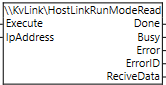
- IpAddress
- STRING[200]
- Destination IP address
- ReciveData
- STRING[10]
- 0=PROGRAM, 1=RUN
HostLinkRunModeChange (change mode)
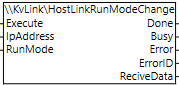
- IpAddress
- STRING[200]
- Destination IP address
- RunMode
- BOOL
- FALSE=PROGRAM, TRUE=RUN
- ReciveData
- STRING[10]
- Received data
HostLinkUnitType (query model)
- IpAddress
- STRING[200]
- Destination IP address
- ReciveData
- STRING[10]
- Received data: PLC model
| KV-8000 : 57 | KV-8000A : 58 | KV-7300 : 54 |
| KV-7500 : 55 | KV-3000 : 51 | KV-5000 : 52 |
| KV-5500 : 53 | KKV-NC32T : 128 | KV-N60xx : 132 |
| KV-N40xx : 133 | KV-N24xx : 134 |
HostLinkErrClr (clear error)
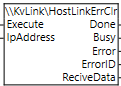
- IpAddress
- STRING[200]
- Destination IP address
- ReciveData
- STRING[10]
- Received data: PLC model
HostLinkEr (check error number)
- IpAddress
- STRING[200]
- Destination IP address
- ReciveData
- STRING[10]
- Received data: error number
HostLinkSetTime (set time)
Matches the time of the source PLC
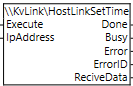
- IpAddress
- STRING[200]
- Destination IP address
- ReciveData
- STRING[10]
- Received data
HostLinkSet (force set)
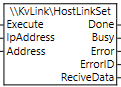
- IpAddress
- STRING[200]
- Destination IP address
- Address
- STRING[8]
- Bit device
- ReciveData
- STRING[10]
- Received data
HostLinkReset (force reset)
- IpAddress
- STRING[200]
- Destination IP address
- Address
- STRING[8]
- Bit device
- ReciveData
- STRING[10]
- Received data
HostLinkSts (continuous force set)
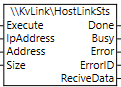
- IpAddress
- STRING[200]
- Destination IP address
- Address
- STRING[8]
- Bit device
- Size
- USINT
- Number to write
- ReciveData
- STRING[10]
- Received data
HostLinkRss (continuous force reset)
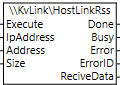
- IpAddress
- STRING[200]
- Destination IP address
- Address
- STRING[8]
- Bit device
- Size
- USINT
- Number to write
- ReciveData
- STRING[10]
- Received data
HostLinkRead (read data)
- IpAddress
- STRING[200]
- Destination IP address
- Address
- STRING[10]
- Word device
- ReciveData
- STRING[20]
- Received data
HostLinkReads (continuous read data)

- IpAddress
- STRING[200]
- Destination IP address
- Address
- STRING[10]
- Word device
- Size
- USINT
- Number to write
- ReciveData
- STRING[1986]
- Received data, space-separated
HostLinkWrite (write data)
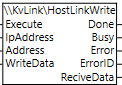
- IpAddress
- STRING[200]
- Destination IP address
- Address
- STRING[10]
- Word device
- WriteData
- STRING[16]
- Write data
- ReciveData
- STRING[10]
- Received data, space-separated
HostLinkWrites (continuous write data)
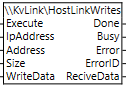
- IpAddress
- STRING[200]
- Destination IP address
- Address
- STRING[10]
- Word device
- Size
- STRING[16]
- Number to write; write data digits within 1968 bytes
- WriteData
- STRING[1975]
- Write data, space-separated
- ReciveData
- STRING[10]
- Received data
HostLinkMBR (monitor read (bits))
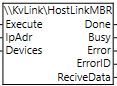
- IpAddress
- STRING[200]
- Destination IP address
- Devices
- STRING[1981]
- Bit devices, space-separated
- ReciveData
- STRING[1986]
- Received data
HostLinkMWR (monitor read (words))
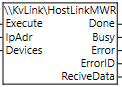
- IpAddress
- STRING[200]
- Destination IP address
- Devices
- STRING[1981]
- Word devices, space-separated
- ReciveData
- STRING[1986]
- Received data
HostLinkUDP (send Host Link command UDP)
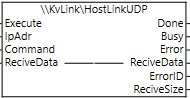
- IpAddress
- STRING[200]
- Destination IP address
- Command
- STRING[1986]
- Host Link command
- ReciveSize
- UINT
- Number of bytes received
- ReciveData
- BYTE[*]
- Received data
HostLinkTCP (send Host Link command TCP)
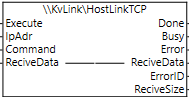
- IpAddress
- STRING[200]
- Destination IP address
- Command
- STRING[1986]
- Host Link command
- ReciveSize
- UINT
- Number of bytes received
- ReciveData
- BYTE[*]
- Received data
Bit devices
R0, B0, MR0, LR0, CR0, T0, C0, CTC0, VB0, etc.
Word devices
R0, B0, MR0, LR0, CR0, VB0, DM0, EM0, FM0, ZF0, W0, TM0, Z1, T0, TC0, TS0, C0, CC0, CS0, AT0, CM0, VM0, etc.
Data format
.U .S .D .L .H can be specified
Response (ReciveData)
Normal
| O | K | [CR] | [LF] |
With data
| Data 1 | sp | Data 2 | sp | Data 3 | sp | ... | Data n | [CR] | [LF] |
Error
| E | ? | [CR] | [LF] |
| E0 | Device number error |
| E1 | Command error |
| E2 | Program not registered |
| E3 | Write protected |
| E4 | Command error |
| E5 | Main unit error |
| E6 | No comment |
Host Link communication program example
HostLinkSet (force set)

| FB input variables | ||
| Address | 'MR0' | |
| FB output variables | ||
| ReciveData | 'OK$R$L' | |
HostLinkRead (read data)

| FB input variables | ||
| Address | 'MR0' | |
| FB output variables | ||
| ReciveData | 'OK$R$L' | |
HostLinkReads (continuous read data)

| FB input variables | ||
| Address | 'MR0' | |
| Size | 5 | |
| FB output variables | ||
| ReciveData | '0 0 0 0 0$R$L' | |
HostLinkWrites (continuous write data)

| FB input variables | ||
| Address | 'MR0' | |
| Size | 3 | |
| WriteData | '0 1 1' | |
| FB output variables | ||
| ReciveData | 'OK$R$L' | |
HostLinkMWR (monitor read (words))

| FB input variables | ||
| Devices | 'DM0 DM10' | |
| FB output variables | ||
| ReciveData | '00257 30683$R$L' | |
HostLinkTCP (send a Host Link command)

| FB input variables | ||
| Command | 'BE 1$R' | |
| FB output variables | ||
| ReciveData | 4F 4B 0D 0A ('OK$R$L') | |
CIP communication
CIP communication reads data and so on using the message communication (server) function of the EtherNet/IP unit
| CipRunModeRead | Check operating mode |
| CipRunModeChange | Change mode |
| CipUnitType | Inquire model |
| CipErrClr | Clear error |
| CipEr | Check error number |
| CipReads | Read consecutive data |
| CipWrites | Write consecutive data |
| CipClass3 | Send CIP command Class 3 |
CipRunModeRead (read operating mode)
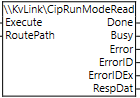
- RoutePath
- STRING[50]
- Route path
- RespDat
- BYTE
- 00=PROGRAM, 01=RUN
CipRunModeChange (change mode)
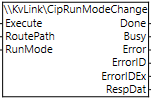
- RoutePath
- STRING[50]
- Route path
- RunMode
- BOOL
- FALSE=PROGRAM, TRUE=RUN
- RespDat
- BYTE
- Received data
CipUnitType (query model)
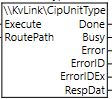
- RoutePath
- STRING[50]
- Route path
- RespDat
- BYTE
- Received data: PLC model
| KV-8000 : 39 | KV-8000A : 3A | KV-7300 : 36 |
| KV-7500 : 37 | KV-3000 : 33 | KV-5000 : 34 |
| KV-5500 : 35 | KV-NC32T : 80 | KV-N60xx : 84 |
| KV-N40xx : 85 | KV-N24xx : 86 |
CipErrClr (clear error)

- RoutePath
- STRING[50]
- Route path
- RespDat
- BYTE
- Received data
CipEr (check error number)
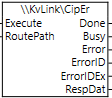
- RoutePath
- STRING[50]
- Route path
- RespDat
- BYTE
- Received data: error number
CipReads (continuous read data)
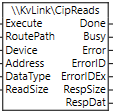
- RoutePath
- STRING[50]
- Route path
- Device
- \\KvLink\DeviceCode
- Device type
- Address
- UDNT
- Device number
- DataType
- BYTE
- 0=default, 1=word, 2=2 words, 3=bit
- ReadSize
- UINT
- Number of devices
- RespSize
- UINT
- Number of bytes received
- RespDat
- BYTE[512]
- Received data
CipWrites (continuous write data)
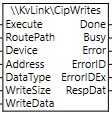
- RoutePath
- STRING[50]
- Route path
- Device
- \\KvLink\DeviceCode
- Device type
- Address
- UDNT
- Device number
- DataType
- BYTE
- 0=default, 1=word, 2=2 words, 3=bit
- WriteSize
- UINT
- Number of bytes to write
- WriteData
- BYTE[500]
- Write data
- RespDat
- BYTE
- Received data
Send CIP command Class 3
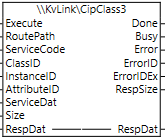
- RoutePath
- STRING[50]
- Route path
- ServiceCode
- UINT
- ClassID
- UDNT
- Device number
- InstanceID
- UINT
- AttributeID
- UINT
- ServiceDat
- BYTE[512]
- Send service data
- Size
- UINT
- Number of send elements
- RespSize
- UINT
- Response size
- RespDat
- BYTE[*]
- Response data
Response (RespDat)
| MR0 | MR1 | MR2 | MR3 | MR4 | MR5 | MR6 | MR7 |
| ON | ON | ON | ON | OFF | ON | OFF | OFF |
| 01 | 01 | 01 | 01 | 00 | 01 | 00 | 00 |
| FF | 02 |
CIP communication program example
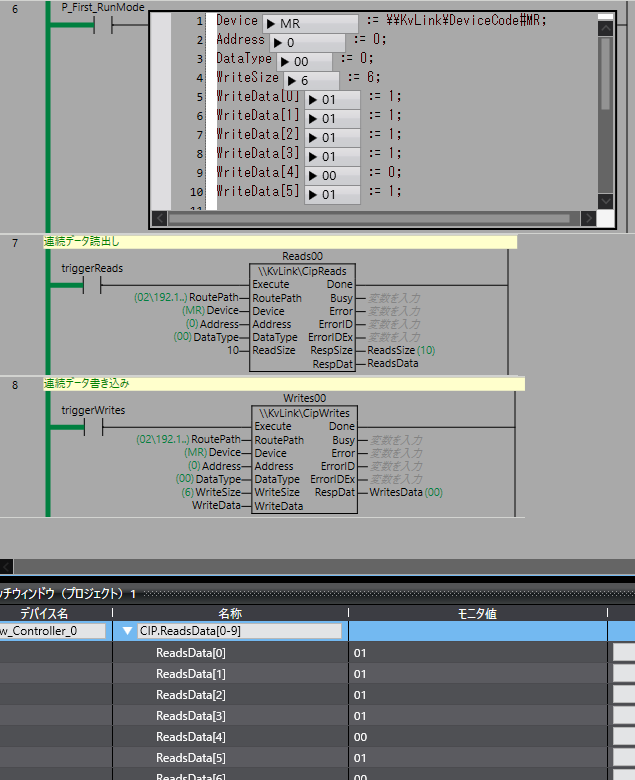
CipReads (continuous read data)
- RoutePath
- '02\192.168.250.31'
- Device
- \\KvLink\DeviceCode#MR
- Address
- 0
- DataType
- 0
- ReadSize
- 10
- RespSize
- 10
- RespData
- 01 01 01 01 00 01 00 00 00 00
CipWrites (continuous write data)
- RoutePath
- '02\192.168.250.31'
- Device
- \\KvLink\DeviceCode#MR
- Address
- 0
- DataType
- 0
- WriteSize
- 10
- WriteData
- 01 01 01 01 00 01
- RespData
- 00
CIP Communication with Tag Specification
Reads tag values using the message communication (server) function of CIP communication
Supported models
KV-8000
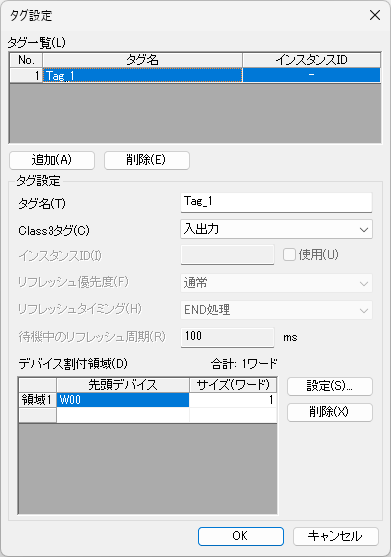
Tag settings on the KV side
Ladder on the NJ side
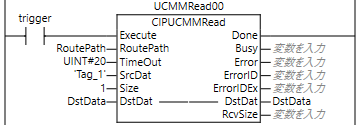
- RoutePath
- STRING[50]
- Route path
- Timeout
- UINT
- Timeout (0.1 s units)
- SrcDat
- STRING
- Remote variable name
- Size
- UINT
- Number of elements to read
- RespSize
- UINT
- Size of data read
- DstDat
- ANY
- Value of the data read
Related pages
TCP and UDP communication test tool

ComCom
An application that sends messages you create using Ethernet socket communication
CIP communication analysis tool

CipMes
An application that sends CIP messages using Ethernet socket communication
Python Host Link communication
KEYENCE Host Link Communication
Host Link communication with KEYENCE PLCs
KvLink library

By downloading, you are deemed to have agreed to the Terms of Use
Files included with the library
- KvLink.slr (library file)
- KvLink.csm2 (library source file)
- KvLinkSample.csm2 (sample using the library)
- KvLink.md (library description)