
 CipMes2026: EtherNet/IP and CIP Communication Analysis Tool
For an explanation of CIP communication, see CIP Message Communication (UCMM)
For an explanation of CIP objects, see the following
OMRON: CIP objects for the NJ/NX built-in EtherNet/IP port
KEYENCE: CipObject (KEYENCE KV Series)
Overview
CipMes is a Windows Forms-based tool for analyzing and testing ODVA EtherNet/IP / CIP communication.
Tested on: Win11
Framework: .NET 10.0
Main uses:
- EtherNet/IP communication analysis
- CIP object testing
- Tag Read / Write
- UCMM / Class3 Messaging
- Checking KEYENCE / OMRON PLC behavior
- Packet dump analysis
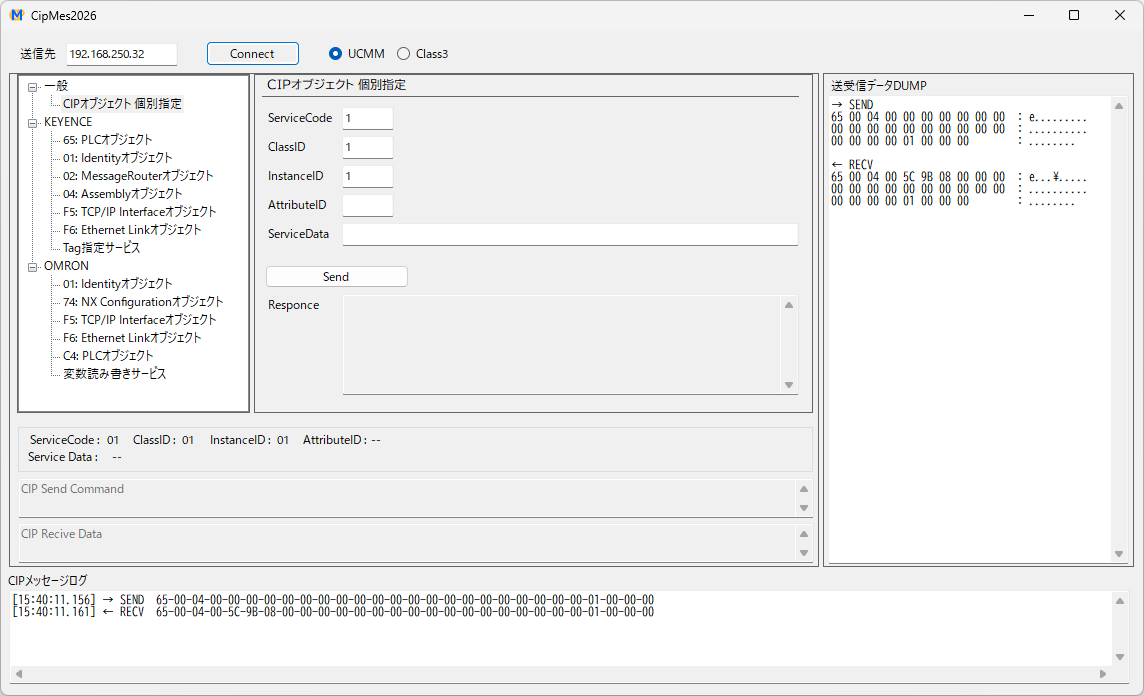
Main screen
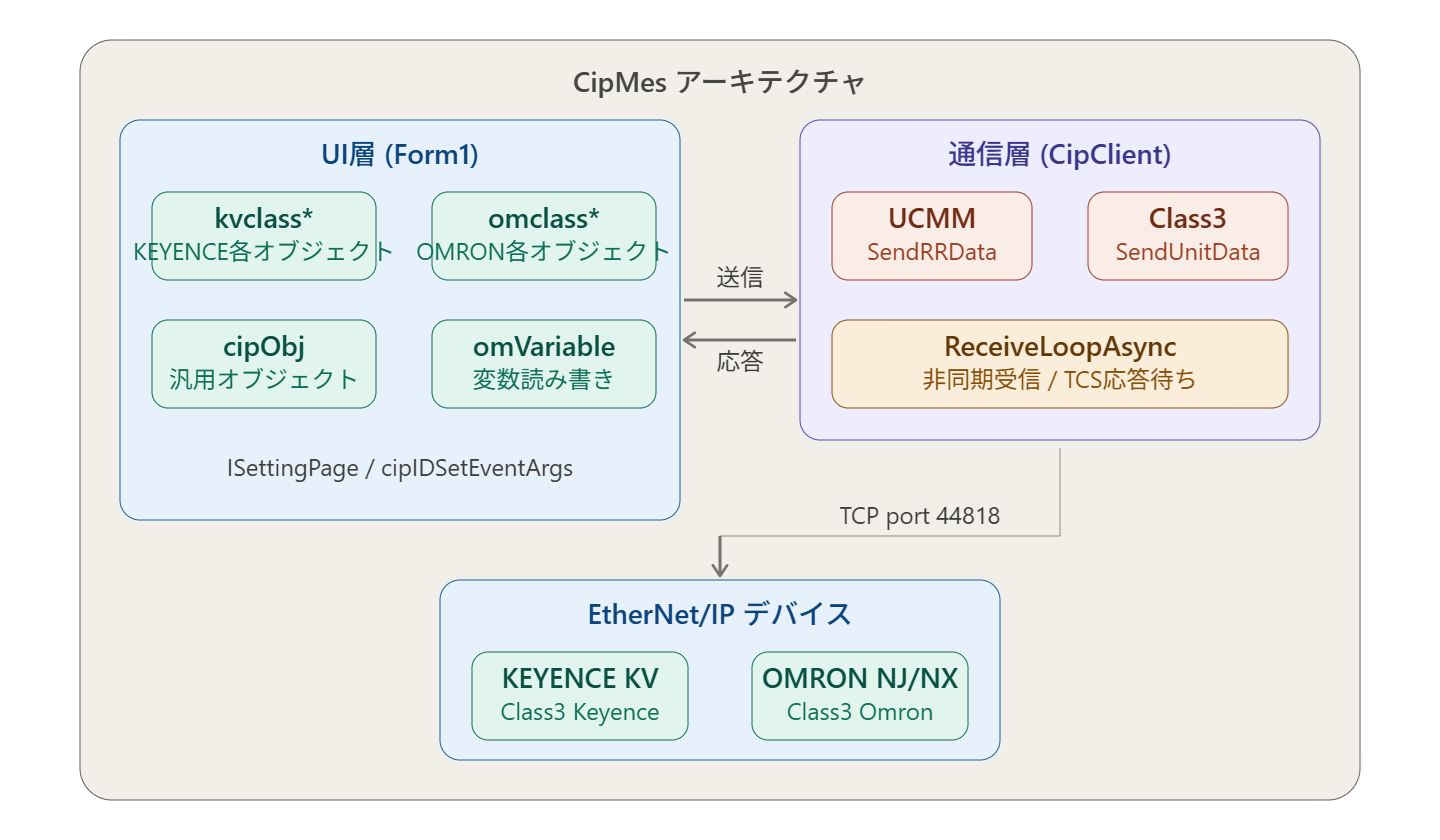
System configuration
Main Features
1. EtherNet/IP connection
Connects to TCP/44818 and executes RegisterSession.
- Session handle management
- TCP Receive Loop
- Keep Alive
2. UCMM communication
Unconnected CIP communication using the Unconnected Message Manager.
3. Class3 Messaging
Supports connected messaging.
- Forward Open
- Connection ID management
- Sequence count management
- SendUnitData
- Forward Close
4. Tag Read / Write
Tag access implemented using symbolic segments.
5. Communication library design
Asynchronous communication
- Based on async/await
- Uses TaskCompletionSource
- Resident receive loop
- ConfigureAwait(false)
Mutual exclusion
- _requestLock
- _sendLock
Request synchronization and socket send synchronization are separated.
6. Logging
Line Monitor
[12:00:00.000] → SEND 6F-00-...
HEX Dump
	→ SEND
	65 00 04 00 00 00 00 00 00 00  : e.........
	00 00 00 00 00 00 00 00 00 00  : ..........
	00 00 00 00 01 00 00 00        : ........
Log File
cip_log.txt
Characteristics
- Supports both UCMM and Class 3
- Handles KEYENCE / OMRON differences
- Can analyze EtherNet/IP packets
- Well suited to ODVA debugging
- Asynchronous design
How to Use
Connection
To connect, enter the destination IP address, select UCMM or Class3 and press the [Connect] button
General
Specify a CIP object directly
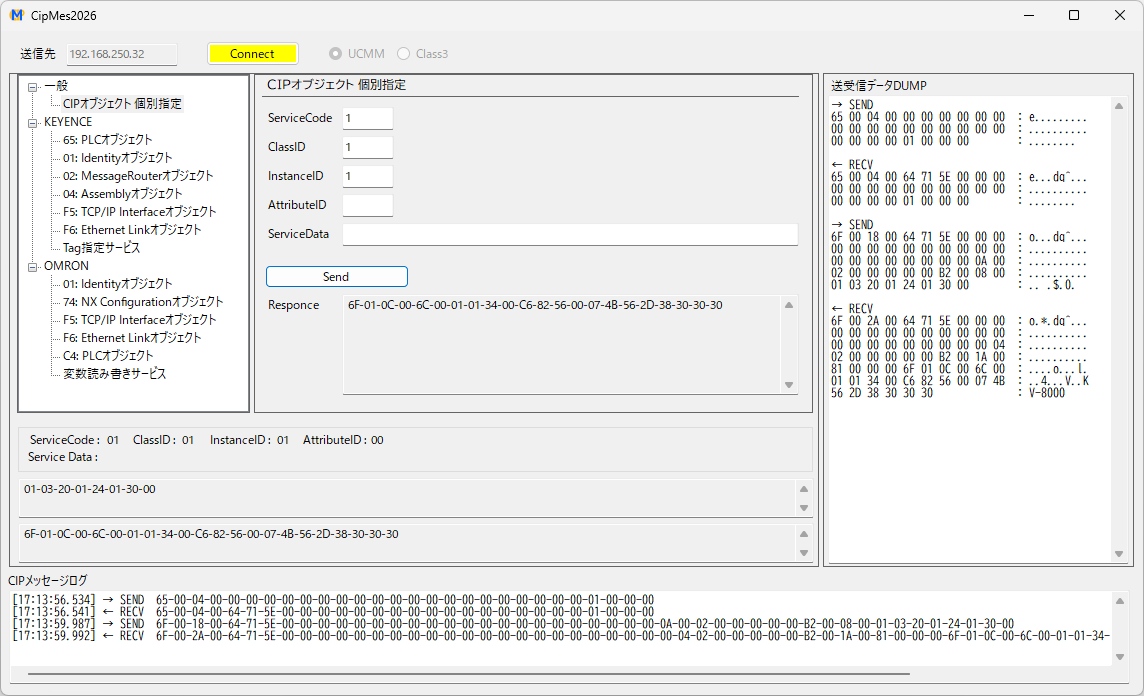
An example reading service code = 01 hex (Get_Attribute_All), class ID = 01 hex (Identity object), instance ID = 01 hex (instance)
-
Enter the service code, class ID, instance ID and attribute ID
The service code is required - If there is service data, enter it one byte at a time separated by hyphens (-) (little endian)
-
Press the [Send] button to send; if response data is received, it is shown in Response
Response is shown byte by byte in little endian - The send/receive dump log is shown on the right and the message log at the bottom
For CIP objects, see the manuals
- KEYENCE: EtherNet/IP Function User's Manual 4-5 Message Communication (Server) Function
- OMRON: NJ/NX-series CPU Unit Built-in EtherNet/IP Port User's Manual 7-5 CIP Object Services
KEYENCE
65: PLC object
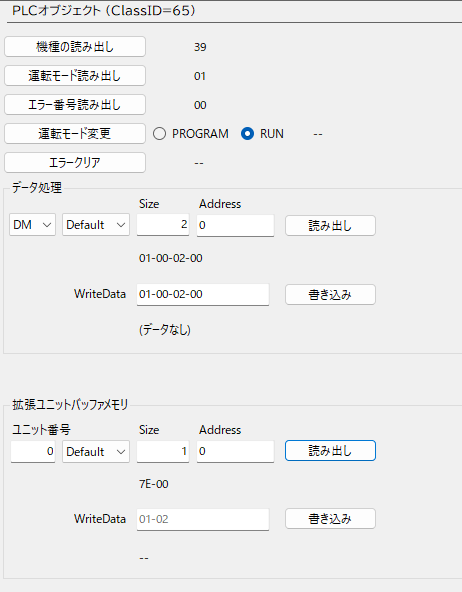
| Read model | Reads the model of the CPU unit |
| Read operating mode | Reads the operating mode of the CPU unit |
| Read error number | Reads the error number occurring in the CPU unit |
| Change operating mode | Switches the operating mode of the CPU unit (RUN/PROG) |
| Clear error | Clears the error occurring in the CPU unit |
| Data processing | Reads/writes data of the specified number of devices consecutively |
| Expansion unit buffer memory | Reads/writes the specified number of expansion unit buffer memory data consecutively |
Read model
| Code | Model |
|---|---|
| 39 | KV-8000 |
| 3A | KV-8000A |
| 36 | KV-7300 |
| 37 | KV-7500 |
| 33 | KV-3000 |
| 34 | KV-5000 |
| 35 | KV-5500 |
| 80 | KV-KC32 |
| 84 | KV-N60__ |
| 85 | KV-N40__ |
| 86 | KV-N24__ |
Read run mode
| 00 | PROGRAM |
| 01 | RUN |
Data processing, expansion unit buffer memory
Read data is shown as a byte sequence
WriteData is written as a byte sequence
01: Identity object
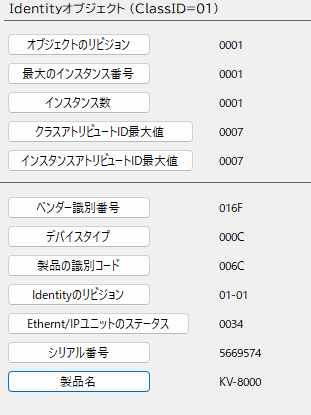
| Object revision | 0001 |
| Maximum instance number | 0001 |
| Number of instances | 0001 |
| Maximum class attribute ID | 0007 |
| Maximum instance attribute ID | 0007 |
| Vendor ID | 016F |
| Device type | 000C |
| Product code | See below |
| Identity revision | Major revision = 01 Minor revision = 01 |
| Status of the EtherNet/IP unit | Reference 1 |
| Serial number | |
| Product name |
| Code | Model |
|---|---|
| 006C | KV-8000 |
| 006B | KV-7500 |
| 0064 | KV-5500 |
| 0065 | KV-EP21V |
| 0069 | KV-NC1EP |
| bit | Name | ||
|---|---|---|---|
| 0 | Owned | ||
| 1 | Reserved | ||
| 2 | Configured | ||
| 3 | Reserved | ||
| 4-7 | Extended Device Status | 0101 | Major fault state |
| 0010 | One or more connections targeting the EtherNet/IP unit have timed out | ||
| 0011 | No connections | ||
| 0110 | One or more connections are receiving the RUN state | ||
| 0111 | Other than the above | ||
| 8 | Minor Recoverable Fault | Always OFF | |
| 9 | Minor Unrecoverable Fault | Always OFF | |
| 10 | Major Recoverable Fault | ON when a recoverable unit error occurs | |
| 11 | Major Unrecoverable Fault | ON when an unrecoverable unit error occurs | |
| 12-15 | Reserved |
02: Message Router object
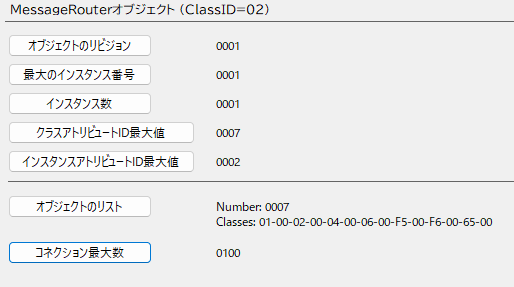
| Object revision | 0001 |
| Maximum instance number | 0001 |
| Number of instances | 0001 |
| Maximum class attribute ID | 0007 |
| Maximum instance attribute ID | 0002 |
| Object list | Number of classes, list of class IDs |
| Maximum number of connections | 0100Hex |
04: Assembly object
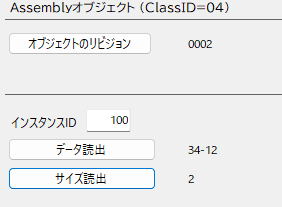
| Object revision | 0002 |
| Read data | Data assigned to the instance |
| Read size | Number of bytes assigned to the instance |
F5: TCP/IP Interface object
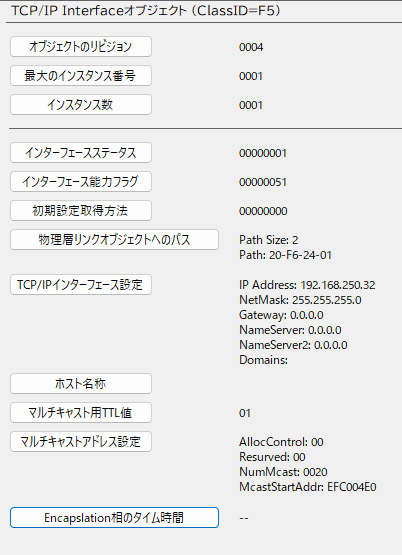
| Object revision | ||
| Maximum instance number | 0001 | |
| Number of instances | 0001 | |
| Interface status | Reference 1 | |
| Interface capability flags | Reference 2 | |
| Configuration method | Reference 3 | |
| Path to the physical link object | Size=2 Path=20F62401 | |
| TCP/IP interface configuration | IP address etc. | |
| Host name | ||
| TTL value for multicast | ||
| Multicast address configuration | Allocation method 0: automatic, 1: user-specified | |
| Reserved | ||
| Number of addresses | ||
| Start address | ||
| Encapsulation inactivity timeout | 120 |
| bit | Name | |
|---|---|---|
| 0-3 | Interface Configuration Status | 0: IP address not set 1: IP address set 2 or higher: not returned by the EtherNet/IP unit |
| 4 | Mcast Pending | 1 when "TTL Value" or "Mcast Config" has been set |
| 5-31 | Reserved |
| bit | Name | |
|---|---|---|
| 0 | BOOTP Client | 1 |
| 1 | MDNS Client | 1 |
| 2 | DHCP Client | 0 |
| 3 | DHCP-DNS Update | 0 |
| 4 | Configuration Settable | 1 |
| 5-31 | Reserved | 0 |
| bit | Name | |
|---|---|---|
| 0-3 | Startup Configuration | 0: fixed IP address 1: BOOTP 2-15: cannot be set |
| 4 | DNS Enable | 1 |
| 5-31 | Reserved | 0 |
F6: Ethernet Link object
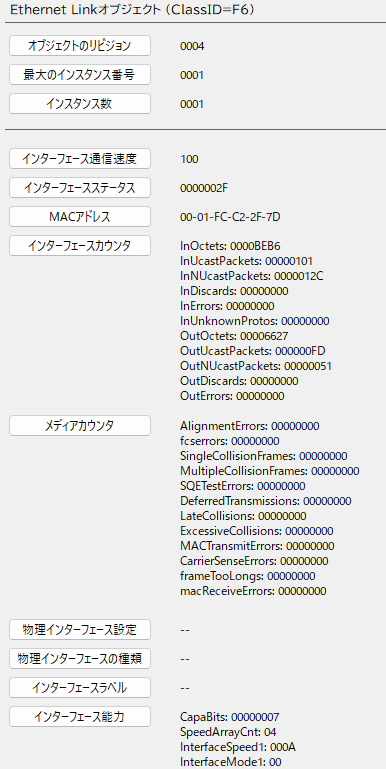
| Object revision | |
| Maximum instance number | 0001 |
| Number of instances | 0001 |
| Interface speed | 10,100 |
| Interface status | Reference 1 |
| MAC address | |
| Interface counters | |
| Media counters | |
| Physical interface configuration | |
| Physical interface type | 2 |
| Interface label | |
| Interface capability |
| bit | Name | |
|---|---|---|
| 0 | Link Status | 0: inactive link 1: active link |
| 1 | Half/FullDuplex | 0: half duplex 1: full duplex |
| 2-4 | Negotiation Status | 0: auto-negotiation in progress 1: auto-negotiation and speed detection failed 2: auto-negotiation failed but speed detection succeeded 3: speed and duplex negotiation succeeded 4: auto-negotiation not attempted |
| 5 | DNS Enable | 0: changes can be applied automatically 1: changes require the Reset service (fixed) |
| 6 | DNS Enable | Fixed at 0 |
| 7-31 | Reserved | 0 |
Tag-specified services
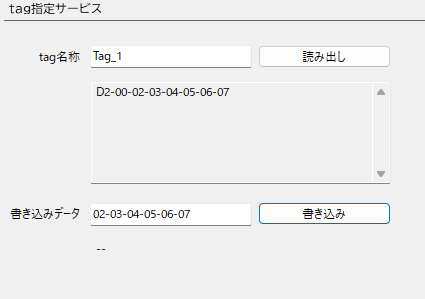
Read data is shown as a byte sequence
WriteData is written as a byte sequence
OMRON
01: Identity object
An object for reading CPU unit identification information and similar
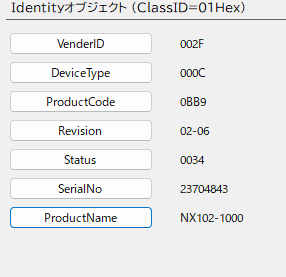
| VenderID | 002F |
| DeviceType | 000C |
| ProductCode | |
| Revision | Major , Minor |
| Status | Reference 1 |
| SerialNo | |
| ProductName |
| bit | Name | ||
|---|---|---|---|
| 0 | Owned | Connection opened as a tag data link target | |
| 1 | Reserved | 0 | |
| 2 | Configured | Tag data link settings present | |
| 3 | Reserved | 0 | |
| 4-7 | Extended Device Status | (b7)0101(b4) | Major fault occurring |
| (b7)0010(b4) | One or more target connections have timed out | ||
| (b7)0011(b4) | No tag data link settings | ||
| (b7)0110(b4) | One or more connections are communicating normally | ||
| (b7)0111(b4) | Other than the above | ||
| 8 | Minor Recoverable Fault | ||
| 9 | Minor Unrecoverable Fault | ||
| 10 | DNS Enable | ||
| 11 | DNS Enable | ||
| 12-15 | Reserved | 0 | |
74: NX Configuration object
An object for reading and writing NX objects and similar
Reads by specifying the NX unit number
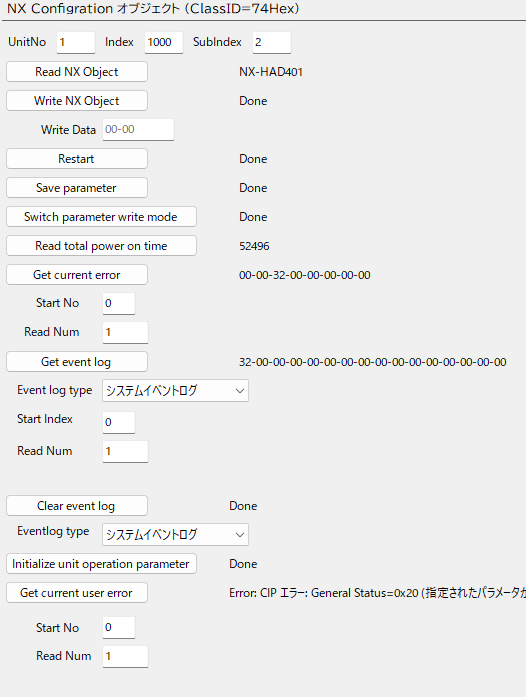
| UnitNo | Unit number NX unit: 0001 - 003F |
| Index | NX object index |
| SubIndex | NX object subindex |
| Read NX Object | Reads an NX object |
| Write NX Object | Writes to an NX object |
| Restart | Restarts the NX unit |
| Save parameter | Saves the NX unit parameters |
| Switch parameter write mode | Switches the NX unit parameter write mode |
| Read total power on time | Total power-on time of the NX unit |
| Get current error | Gets current errors |
| Get event log | Gets the event log |
| Clear event log | Clears the event log |
| Initialize unit operation parameter | Initializes the unit operation settings (NX objects) of the NX unit |
| Get current user error | Gets user-defined errors |
F5: TCP/IP Interface object
An object for writing/reading settings such as the IP address, subnet mask and default gateway
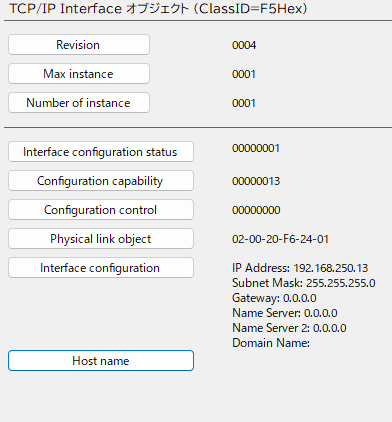
| Revision | 0001:Ver1.01 0002:Ver1.02 0003:Ver1.10 0004:Ver.1.11 |
| Max instance | 0001 |
| Number of instance | 0001 |
| Interface configuration status | bit0-3: 0 = IP address not set, 1 = IP address set bit4-5: reserved bit6: 0 = no IP address conflict detected, 1 = IP address conflict detected 7-31: reserved |
| Configuration capability | bit0: 1 bit1: 1 bit2: DHCP client supported bit3: 0 bit4: 1 bit5: 0 bit6: 0 bit7: 1 bit8-31: 0 |
| Configuration control | bit0-3: 0 = fixed IP, 1 = BOOTP, 2 = DHCP bit4: 0 = DNS disabled, 1 = DNS enabled 5-31: 0 |
| Physical link object | Path size = 0002 Path = 20F62401 |
| Interface configuration | Interface configuration |
| Host name | Host name |
F6: Ethernet Link object
An object for setting/reading Ethernet communication and reading the Ethernet communication status
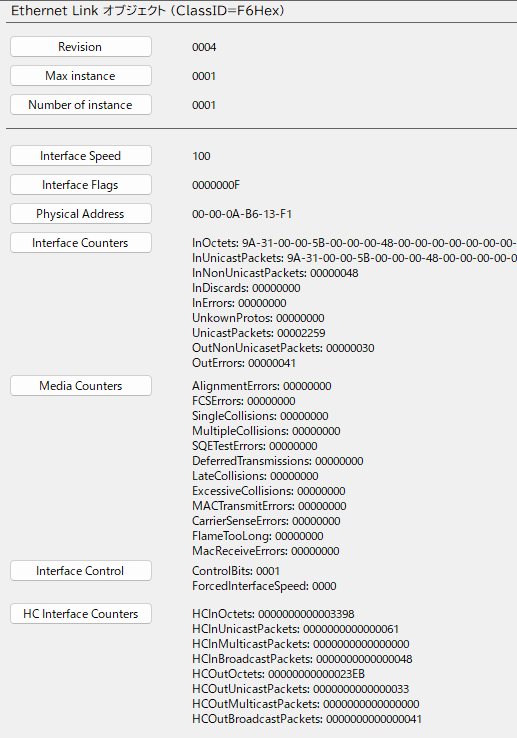
| Revision | 0002: Ver. 1.11 or earlier 0004: Ver. 1.12 or later |
| Max instance | 0001 |
| Number of instance | 0001 |
| Interface Speed | Interface speed |
| Interface Flags | Interface status |
| Physical Address | MAC address |
| Interface Counters | Number of packets sent and received |
| Media Counters | Media counters of the communication port |
| Interface Control | Interface control settings |
| HC Interface counters | Packet receive counter on the high-capacity communication interface |
| HC Media Counters | High-capacity media counters of the communication port |
C4: PLC object
An object for setting/reading Ethernet communication and reading the Ethernet communication status
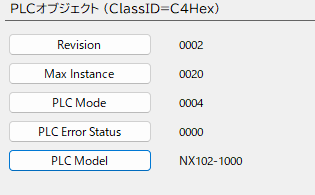
| Revision | 0002 |
| Max instance | 0001 |
| PLC Mode | Read operating mode 0001: PROGRAM mode 0004: RUN mode |
| PLC Error Status | Error occurred 0000: no error 0001: error occurred |
| PLC Model | Controller model |
Variable read/write services
Reads/writes variable values
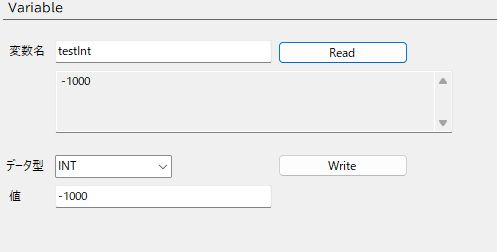
Read
Enter the name of the variable to read and press the [Read] button
Data type and value when writing
| Data type | How to write values |
|---|---|
| Date | 2026-05-27 |
| Time | 00:00:01.000 |
| DateAndTime | 2026-05-27 12:00:00.000 |
| TimeOfDay | 01:02:03.005 |
| Abbreviated STRUCT | Not supported |
| STRUCT | Not supported |
| ARRAY | 01-00-02-00-03-00-04-00-05-00-06-00-07-00-08-00-09-00-0A-00 Enter as a byte sequence in little endian |
| BOOL | 1,0 |
| SINT - LINT | -100 |
| USINT - ULINT | 100 |
| REAL,LREAL | -0.1 |
| STRING | abcd |
| BYTE | 1A |
| WORD - LWORD | 010A |
FAQ
Is CipMes2026 free?
Yes, it is free to use.
Which PLCs are supported?
The OMRON NJ/NX series and KEYENCE KV series are supported.
Does it support UCMM communication?
Yes.
Does it support Class 3 messaging?
Yes.
Related pages
OMRON

CIP Message Communication
Sends CIP messages from a PC to a PLC connected to an EtherNet/IP port and reads values

Related tools

ComEmulator
When connecting a PLC to an external device via RS-232C or Ethernet, you can emulate the external device on a PC before connecting it

ComCom
An application that sends messages you create using Ethernet socket communication

FinsMes
An application that sends FINS messages using Ethernet socket communication
Download
By downloading, you are deemed to have agreed to the Terms of Use