
OMRON FINS Communication with Python
Overview
Sends FINS commands, OMRON's communication protocol, from Python
FINS commands are communication commands for message services, used between PCs and PLCs and between PLCs and devices
Here I created a class for message communication with a PLC over Ethernet using Python
Operating environment
Tested environment: Win10
python3.9
PLC OMRON CJ/NJ/NX series
Configuration
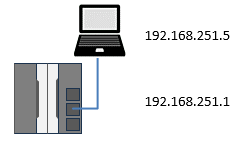
For the NX series, connect to port 2 (FINS communication is restricted on port 1)
Installation
> pip install finscommand
Method list
| Methods | Description |
|---|---|
| read | Read memory area |
| write | Write memory area |
| fill | Memory area fill |
| run | Change operating mode |
| stop | Change to program mode |
| ReadUnitData | CPU unit data read |
| ReadUnitStatus | Read memory area |
| ReadCycletime | Read memory area |
| Clock | Read clock information |
| SetClock | Clock write |
| ErrorClear | Error clear |
| ErrorLogRead | Read error log |
| ErrorLogClear | Clear error log |
| SendCommand | Send other FINS commands |
Creating the object
fins(IPAddress, remote FinsAddress, local FinsAddress, timeout)
| IPAddress | Destination IP address |
|---|---|
| Remote FinsAddress | Destination FINS address |
| Local FinsAddress | Source FINS address |
| Timeout | Timeout (2.0 s) |
Return value
| Return value | fins object |
|---|
Example
finsudp = fins('192.168.250.1', '0.1.0', '0.5.0', 1.0)
The fins class creates an object with the IP address of the communication partner, the remote FINS address and the local FINS address
If the FINS address is omitted, the last octet of the remote IP address is used as the node in the destination FINS address
If no timeout is specified, it is 2 s
FINS address
A FINS address is three numbers, "FINS network address . node address . unit address", joined with . (dots)
The network address is 0 (local network), assuming a direct connection
The node address matches the last number of the IP address: 0.1.0 for the receiver (PLC), and 0.5.0 for the sender (PC), whose IP address is 192.168.250.5
The unit address is 0 (to the CPU)
For details, see the explanation of FINS addresses
Methods
read(address, num)
I/O memory area read (01 01)
| address | Memory address |
|---|---|
| num | Number of elements to read |
Return value
| Return value | Read data (byte array) |
|---|
Convert the read data with the data conversion methods
Memory address notation
| Memory type | Example | |
|---|---|---|
| Value | CIO | 10 = 10CH |
| W | WR | W10 = WR10 |
| H | HR | H10 = HR10 |
| D | DM | D10 = DM10 |
| E0_ ~ EF_ | EM0 ~ EMF | E0_10 = EM0_10 |
Example
# Read 10 CH from E0_30000
data = finsudp.read('E0_30000', 10)
Read values by specifying the address and number of CH with the read method of the object created above
Specify addresses as 000 for CIO, D0 for DM, E0_0 for EM, W0 for WR and so on
The read data is received as bytes
write(address, data)
Memory area write (01 02)
| address | Memory address |
|---|---|
| data | Write data (byte array) |
Return value
| 01 | 02 | End code |
End code on normal completion
| 01 | 02 | 00 | 00 |
Example
# Write data from E0_0
rcv = finsudp.write('E0_0', data)
fill(address, num, data)
Memory area fill (01 03)
Writes the same data to a contiguous memory area
| address | Memory address |
|---|---|
| num | Number of elements to write |
| data | Write data |
Return value
| 01 | 03 | End code |
Example
# Write 55 to 10 CH from D110 (D110-119)
rcv = finsudp.fill('D110', 10, 55)
multiRead(addresses)
Multiple memory area read (01 04)
| address | Memory addresses, comma-separated (MAX 167) |
|---|
Return value
| Return value | Read data (byte array) |
|---|
Example
# Multiple read D1000, D1010, D1020
data = finsudp.multiRead('D1000, D1010, D1020')
run(mode)
Change operating mode (04 01)
Example
# Change operating mode (0x02=Monitor 0x04=Run)
rcv = finsudp.run(0x02)
stop()
Change to program mode (04 02)
Example
# Change to program mode
rcv = finsudp.stop()
ReadUnitData()
CPU unit data read (05 01)
| Bytes | 4 | 20 | 20 | 40 | 12 |
|---|---|---|---|---|---|
| Description | 05 01 00 00 | CPU unit model | System version | System information | Area information |
Example
# Read CPU unit data
rcv = finsudp.ReadUnitData()
ReadUnitStatus()
Unit status read (06 01)
Return value
| Bytes | 4 | 1 | 1 | 2 | 2 | 2 | 2 | 16 |
|---|---|---|---|---|---|---|---|---|
| Description | 06 01 00 00 | Operating status | Operating mode | Fatal error information | Non-fatal error information | Message present | Error code | Error message |
Example
# Read CPU unit status
rcv = finsudp.ReadUnitStatus()
ReadCycletime()
Cycle Time Read (06 20)
Return value
| Bytes | 4 | 4 | 4 | 4 |
|---|---|---|---|---|
| Description | 06 20 00 00 | Mean | Max. | Min. |
Example
# Read cycle time
rcv = finsudp.ReadCycletime()
Clock()
Clock Read (07 01)
Return value type: datetime.datetime
# Read clock information
rcv = finsudp.Clock()
SetClock(datetime)
Write clock information (write the PC time)
# Write clock information (write the PC time)
rcv = finsudp.SetClock(datetime.now())
ErrorClear()
Clear all active errors (21 01)
Example
# Clear errors
rcv = finsudp.ErrorClear()
ErrorLogRead()
Read error log (21 02)
Return value
| Bytes | 4 | 2 | 2 | 2 | 10 | ... | 10 |
|---|---|---|---|---|---|---|---|
| Description | 21 02 00 00 | Maximum number of records | Number of stored records | Number of records to read | Error log data | ... | Error log data |
Example
# Read error log, latest 10 entries
rcv = finsudp.ErrorLogRead()
ErrorLogClear()
Error Log Clear (21 03)
# Clear error log
rcv = finsudp.ErrorLogClear()
SendCommand(cmd)
Send FINS commands directly
cmd = bytearray([0x05,0x01])
rcv = finsudp.SendCommand(cmd)
Data conversion methods
Example
print (finsudp.toInt16(data))
Methods for converting the received bytes
The method to use depends on what kind of data the bytes contain
| Method name | Length of data to convert |
|---|---|
| toBin | Bit string |
| WordtoBin | Bit string in 16-bit units |
| toInt16 | 16-bit number |
| toUInt16 | 16-bit unsigned |
| toInt32 | 32-bit number |
| toUInt32 | 32-bit unsigned |
| toInt64 | 64-bit number |
| toUInt64 | 64-bit unsigned |
| toFloat | Floating point |
| toDouble | Double precision |
| toString | String |
Example
# Sample
from datetime import datetime
from finscommand import fins

try:
	# Create an instance
	# Use port 2 on NX
	f = fins("192.168.251.1")   # destination IP address (, destination FINS address, local FINS address, timeout)

	# Read 1 CH from CH 0, bit notation
	data = f.read('0', 1)
	print(f.toBin(data))                  # zero-suppressed notation
	print(f.WordToBin(data))              # zero-padded notation
	print(list(f.WordToBin(data)))        # zero-padded list

	# Read 2 CH from W0, bit notation
	data = f.read('W0', 2)
	print(f.toBin(data))
	print(f.WordToBin(data))
	print(list(f.WordToBin(data)))

	# Read 4 CH from H0, bit notation
	data = f.read('H0', 4)
	print(f.toBin(data))
	print(f.WordToBin(data))
	print(list(f.WordToBin(data)))

	# Read D1000, bit notation
	data = f.read('D1000', 1)
	print(f.toBin(data))
	print(f.WordToBin(data))
	print(list(f.WordToBin(data)))

	# Read D1001 as INT
	data = f.read('D1001', 1)
	print(f.toInt16(data))

	# Read D1002-D1003 as DINT
	data = f.read('D1002', 2)
	print(f.toInt32(data))

	# Read D1004-D1007 as LINT
	data = f.read('D1004', 4)
	print(f.toInt64(data))

	# Read D1008 as UINT
	data = f.read('D1008', 1)
	print(f.toUInt16(data))

	# Read D1009-D1010 as UDINT
	data = f.read('D1009', 2)
	print(f.toUInt32(data))

	# Read D1011-D1014 as ULINT
	data = f.read('D1011', 4)
	print(f.toUInt64(data))

	# Read D1015-D1016 as FLOAT
	data = f.read('D1015', 2)
	print(f.toFloat(data))

	# Read D1017-D1020 as DOUBLE
	data = f.read('D1017', 4)
	print(f.toDouble(data))

	# Read D1021-D1025 as DOUBLE
	data = f.read('D1021', 5)
	print(f.toString(data))


	# Read 10 CH of data from D1100
	data = f.read('D1100', 10)
	print(f.toUInt16(data))

	# Write the 10 CH of data read above from E0_0
	rcv = f.write('E0_0', data)
	print(rcv)

	# Write sequential numbers to 1000 CH from D1000
	l = list(range(1000))
	writedata = list()
	for num in range(1000):
		writedata.extend(list(int(l[num]).to_bytes(2,'big')))
	rcv = f.write('D1000', writedata)
	print(rcv)

	# Write 55 to 10 CH from D110
	rcv = f.fill('E0_100', 10, 55)
	print(rcv)

	# Multiple read D1000, D1010, D1020
	data = f.multiRead('D1000, D1010, D1020')
	print(f.toUInt16(data))

	# Read CPU unit data
	rcv = f.ReadUnitData()
	print(rcv)

	# Read CPU unit status
	rcv = f.ReadUnitStatus()
	print(rcv)

	# Read clock information
	rcv = f.Clock()
	print(rcv)

	# Write clock information (write the PC time)
	rcv = f.SetClock(datetime.now())
	print(rcv)

	# CJ only below
	isCJ = False
	if isCJ:
		# Change to monitor mode (0x02=Monitor 0x04=Run) (not supported on NJ/NX)
		rcv = f.run(0x04)
		print(rcv)

		# Change to program mode (not supported on NJ/NX)
		rcv = f.stop()
		print(rcv)

		# Read cycle time (not supported on NJ/NX)
		rcv = f.ReadCycletime()
		print(rcv)

		# Clear errors
		rcv = f.ErrorClear()
		print(rcv)

		# Read error log, latest 10 entries
		rcv = f.ErrorLogRead()
		print(rcv)

		# Clear error log
		rcv = f.ErrorLogClear()
		print(rcv)


	# Use this to send other FINS commands
	# Example: 0x05 0x01 0x01 read CPU unit data
	cmd = bytearray([0x05,0x01])
	rcv = f.SendCommand(cmd)
	print(rcv)


except Exception as e:
	print(e)
Frequently Asked Questions (FAQ)
What is FINS communication?
A communication protocol used by OMRON PLCs.
What if I cannot connect to an NX series PLC?
Use port 2 on the NX series.
Does it support the CJ series?
Supports the CJ/NJ/NX series.
Can it be installed with pip?
Yes, with pip install finscommand.
Related pages
- FINS Message Communication
- FinsMes OMRON FINS communication test tool
- ComCom2026 TCP/UDP communication test tool
Qiita article (Japanese)
 Sending OMRON FINS commands with Python
 FinsCommand