
- KV
Connecting to MITSUBISHI PLCs with MC protocol commands
Overview

Performs message (MC protocol command) communication with the Ethernet port of a MITSUBISHI PLC to read the PLC status and read/write memory.
This library uses binary code with the 3E frame. Access is limited to the connected PLC only.
| Frame | 3E frame |
| Code | Binary code |
What Is the MC Protocol?
The MC protocol is the command system of the network message service for MITSUBISHI PLCs.
By sending MC protocol commands to MITSUBISHI PLCs connected via Ethernet, Controller Link, Host Link and so on, you can receive the responses to the commands.
Commands can also be sent to intelligent function modules, not only CPU modules.
Using the network relay function, you can access across up to three network levels.
This page explains how to connect a PC and a PLC via Ethernet and send MC protocol commands to read the PLC status and read/write memory.
Manuals
For an explanation of the MC protocol,
see the MELSEC Communication Protocol Reference Manual and similar
MCP function blocks
I created function blocks that use the socket communication function of the KV8000 series to connect to MITSUBISHI PLCs via UDP/IP; here is how to use them
FB list
| Name | Description |
|---|---|
| McpUDP | MC protocol UDP communication |
| McpRead | Memory area read (word units) |
| McpReadBit | Memory area read (bit units) |
| McpWrite | Memory area write (word units) |
| McpWriteBit | Memory area write (bit units) |
| McpRandomRead | Random read in word units |
| memOffset | Separating the device code and offset of a device address |
Common FB inputs/outputs
| Name | Data type | Description |
|---|---|---|
| EN | BOOL | Start |
| UnitNo | UINT | Unit number |
| SocketNo | UINT | Socket number |
| SocketSetting | UINT[8] | Setting data for U_SOPEN |
| Name | Data type | Description |
|---|---|---|
| ENO | BOOL | Start |
| Busy | BOOL | Executing |
| Done | BOOL | Normal end |
| Error | BOOL | Error end |
| SocketStatus | UINT[12] | Socket processing status read with U_SSTAT |
| EndCode | UINT | MC protocol end codes |
| Element number | Description |
|---|---|
| [0] | Own port number |
| [1] | Destination IP address (1st byte) |
| [2] | Destination IP address (2nd byte) |
| [3] | Destination IP address (3rd byte) |
| [4] | Destination IP address (4th byte) |
| [5] | Destination port number |
| [6] | Request timeout (ms) |
| [7] | UDP send flag |
| Code | Description |
|---|---|
| 4000H - 4FFFH | Error detected by the CPU module |
| 0050H | The command/response type of the subheader is a code other than the specified ones |
| 0055H | The external device requested a data write while the CPU module was in RUN, when writing during RUN is not allowed |
| C050H | With ASCII code communication set in "Communication data code setting," ASCII data that cannot be converted to binary code was received |
| C051H - C054H | The number of points to write or read is outside the allowed range |
| C056H | The write or read request exceeds the maximum address |
| C058H | The request data length after ASCII-binary conversion does not match the number of data in the character part (part of the text) |
| C059H | • The command or subcommand is specified incorrectly. • The command or subcommand cannot be used on the CPU module |
| C05BH | The CPU module cannot write to or read from the specified device |
| C05CH | The request content is incorrect (e.g. bit-unit write/read to a word device) |
| C05DH | Not registered for monitoring |
| C05FH | The request cannot be executed on the target CPU module |
| C060H | The request content is incorrect (e.g. incorrect data specified for a bit device) |
| C061H | The request data length does not match the number of data in the character part (part of the text). |
| C06FH | When "Communication data code setting" is binary, an ASCII request message was received; or when the setting is ASCII, a binary request message was received. (This error code is only registered in the error history; no error response is returned.) |
| C070H | Extended specification of device memory is not possible for the target station |
| C0B5H | Data that the CPU module cannot handle was specified |
| C200H | The remote password is incorrect |
| C201H | The port used for communication is locked by the remote password; or when "Communication data code setting" is ASCII code, the subcommand and later cannot be converted to binary code because the remote password is locked. |
| C204H | The device differs from the external device that requested the remote password unlock |
* Example for the QnUCPU built-in Ethernet Excerpt from the QnUCPU User's Manual (Communication via Built-in Ethernet Port)
| Symbol | Device name | Notation | Example |
|---|---|---|---|
| SM | Special relay | Decimal | SM0 |
| SD | Special register | Decimal | SD0 |
| X | Input | Hexadecimal | X1F |
| Y | Output | Hexadecimal | Y1F |
| M | Internal relays | Decimal | M0 |
| L | Latch relays | Decimal | L0 |
| F | Annunciator | Decimal | F0 |
| V | Edge relay | Decimal | V0 |
| B | Link relays | Hexadecimal | B1F |
| D | Data registers | Decimal | D0 |
| W | Link registers | Hexadecimal | W1F |
| TS | Timer contact | Decimal | TS0 |
| TC | Timer coil TC | Decimal | TC0 |
| TN | Timer current value | Decimal | TN0 |
| SS | Retentive timer contact | Decimal | SS0 |
| SC | Retentive timer coil | Decimal | SC0 |
| SN | Retentive timer current value | Decimal | SN0 |
| CS | Counter contact | Decimal | CS0 |
| CC | Counter coil | Decimal | CC0 |
| CN | Counter current value | Decimal | CN0 |
| SB | Link special relay | Hexadecimal | SB1F |
| SW | Link special register | Hexadecimal | SW1F |
| S | Step relay | Decimal | S0 |
| DX | Direct access input | Hexadecimal | DX1F |
| DY | Direct access output | Hexadecimal | DY1F |
McpRead (batch read in word units)
Command code: 0401
Subcommand: 00
Reads values from devices in word units
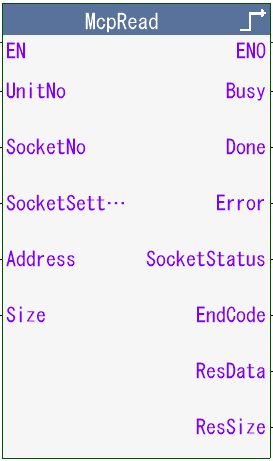
- Address
- Read start address
- Size
- Number of words to read
- ResData
- Read data
- ResSize
- Number of words to read
McpReadBit (batch read in bit units)
Command code: 0401
Subcommand: 01
Reads values from devices in bit units
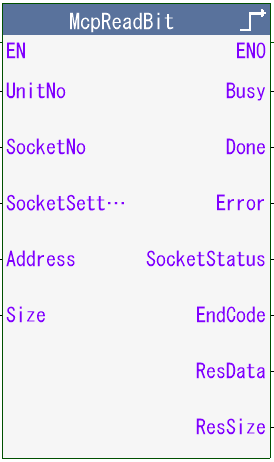
- Address
- Read start address
- Size
- Number of bits to read
- ResData
- Read data
- ResSize
- Number of words to read
Read bit information (for M100 to M109)
| ResData[0] | ResData[1] | ResData[2] | |||
| 00H | 01H | 00H | 10H | 00H | |
| 0 | M100 |
| 0 | M101 |
| 0 | M102 |
| 1 | M103 |
| 0 | M104 |
| 0 | M105 |
| 1 | M106 |
| 0 | M107 |
| 0 | M108 |
| 0 | M109 |
| Remainder |
ResSize = 3
McpWrite (batch write in word units)
Command code: 1401
Subcommand: 00
Writes values to devices in word units

- Address
- Write start address
- WriteSize
- Number of words to write
- WriteData[]
- Write data (for the number of elements)
McpWriteBit (batch write in bit units)
Command code: 1401
Subcommand: 01
Writes values to devices in bit units
- Address
- Write start address
- WriteSize
- Number of bits to write
- WriteData[]
- Write data
For the write data, see the read bit information of McpReadBit
McpRandomRead (random read)
Command code: 1403
Subcommand: 00
Reads device values by specifying device numbers

- WordDevice
- Word addresses to read
(comma-separated) - DWordDevice
- Double-word addresses to read
(comma-separated)
- ResData
- Read data
- ResSize
- Number of words to read
| WordDevice | String | 'D0, T0, M100, X2F' |
| DWordDevice | String | 'D1500, Y160, M1111' |
| ResData[0] | D0 | |
| ResData[1] | T0 | |
| ResData[2] | M100 | |
| ResData[3] | X2F | |
| ResData[4,5] | D1500 | |
| ResData[6,7] | Y160 | |
| ResData[8,9] | M1111 |
McpUDP (MC protocol UDP communication)
Sends MC protocol commands
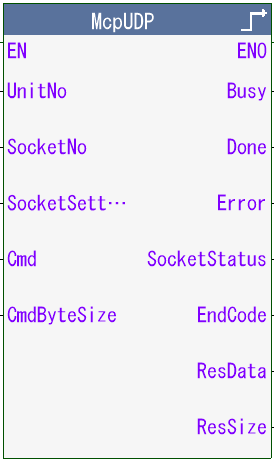
- Cmd
- MC protocol command
- CmdByteSize
- Number of command bytes
- ResData
- Response
- ResSize
- Number of response bytes
Implementation
1. Download "SampleMcpUdp.zip" or "McpUdp.kufb" and add it to your project in KV STUDIO.
2. Set it on the same network as the Ethernet port of the MITSUBISHI PLC.
3. Enable the socket function of the KV8000
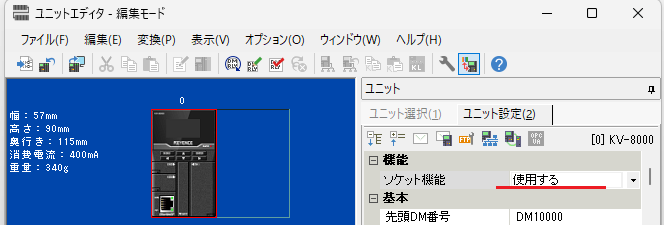
4. Set the socket to use to "UDP"

5. To check communication between the PLCs, try reading values from DM0 of the MITSUBISHI PLC with the McpRead FB
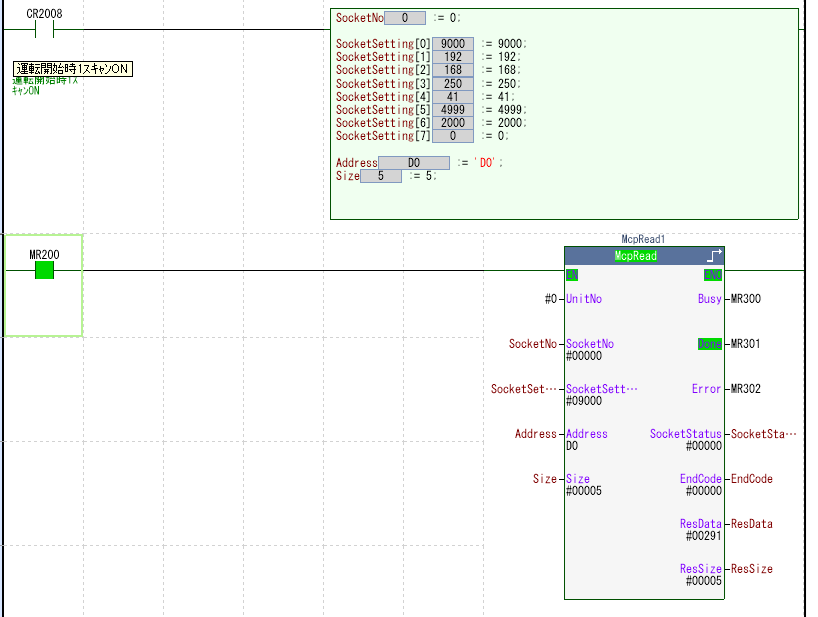
6. If Done turns ON and the values from DM0 are read as above, the connection is working
If it does not work, try "SampleMcpUdp.zip" with the MITSUBISHI PLC's IP address set to 192.168.250.41 and the KV's IP address set to 192.168.250.32
Supported PLCs
- Q series
- L series
- iQ-R series
- iQ-F series
- FX5U
Related pages
TCP and UDP communication test tool

ComCom
An application that sends messages you create using Ethernet socket communication
Python MC protocol communication
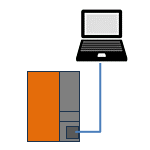
MITSUBISHI MC Protocol Communication
MC protocol communication with MITSUBISHI PLCs
Download


Operation on the KV-X series has not been verified
Refer to the KV series sample